How can I look up past call details using the ID number?

Status
Not open for further replies.

PeeBeeEx

Trainee Partner
Joined
Aug 31, 2018
Messages
33
Reaction score
2
We have client that seems to be occasionally hitting their SC limit during peak periods.

On the homepage of the dashboard in the Event Log I can see messages saying they're reaching their license limit, such as:

SIP Server/Call Manager ID: 8193
License limit is reached, active calls: [7870,7872,7873,7874,7875,7877,7878,7879,7882]


The office manager thinks that when this happened today it didn't seem like they would have had 8 simultaneous calls going on.

I'm guessing the numbers within the [XXXX, XXXX, XXXX ] represent ID numbers for the calls which were active at the time.

I've tried clicking about the dashboard and a few log files and haven't been able to find anything with these ID numbers thus far.

Which log/page would contain these ID numbers where I could gather more information on the call? (Time, Date, Callee, Caller, etc.)
 
You can generate a report for that day and see what calls were made.

If you have verbose logging enabled from the Activity Log settings page, then you can gather richer logs. You can also filter by call number.

What are these numbers? Are you using bridges on this PBX?

7870,7872,7873,7874,7875,7877,7878,7879,7882
 
You can generate a report for that day and see what calls were made.

If you have verbose logging enabled from the Activity Log settings page, then you can gather richer logs. You can also filter by call number.

What are these numbers? Are you using bridges on this PBX?

7870,7872,7873,7874,7875,7877,7878,7879,7882

Thanks for the response.

How would I generate a report? Is this something to do with CDR?

Don't currently have this enabled:

1586352621553.png

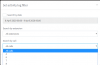
Activity Log Settings from the Dashboard is set to "Low" and keep a backup of log files for "1" day.

Changing it to verbose shows a warning that it's very CPU intensive and should only be used for debugging. It then suggests switching back to low rather than medium afterward.

Not sure if switching to verbose for a few days would cause an issue?

This was also the first place I tried searching for these ID numbers, but it didn't seem to show anything.

7870, 7872, 7873, etc. I have no idea what these numbers are, I was under the impression they were like a unique ID the PBX gave each call?

In short, at 11:51AM on 08/04/2020 the system showed we had reached our call limit. I'm basically just wanting to see what the 8 active calls at that time were.
 
Have you checked the calls filtering feature in Activity Log? I think you should find the call numbers there for those specific calls, but not sure if Low logging would keep enough details.
1586355529245.png

Reports are available in Pro and Enterprise, so if you are on Standard you will not see them.

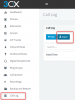
You can also go to call log and export.
1586355684356.png

CDR can help but if it was not enabled at the time, then it will be empty.
 
  • Like
Reactions: Waddy
Have you checked the calls filtering feature in Activity Log? I think you should find the call numbers there for those specific calls, but not sure if Low logging would keep enough details.

Dashboard > Activity Log > Filter

I've tried fiddling with the filter, but it never gives me clear cut information. For example when trying to search for information on call 8385, instead of it actually giving me some information saying from/to, it shows things such as:

04/09/2020 11:07:50 AM - [CM101006]: License Limit: Number of simultaneous calls covered by current license has been exceeded. Call(C:8393) from Line:10000<<XXXXXXXXXX has been rejected. Active calls: [8382,8384,8385,8386,8387,8388,8389,8392,8393]
04/09/2020 11:07:39 AM - [CM101006]: License Limit: Number of simultaneous calls covered by current license has been exceeded. Call(C:8391) from Extn:110 has been rejected. Active calls: [8382,8383,8384,8385,8386,8387,8388,8389,8391]
04/09/2020 11:07:12 AM - [CM101006]: License Limit: Number of simultaneous calls covered by current license has been exceeded. Call(C:8390) from Extn:110 has been rejected. Active calls: [8382,8383,8384,8385,8386,8387,8388,8389,8390]

What I want to do is search for details on the calls which were apparently "active" at this time, just so I can actually say to the client - we definitely were at the call limit, here's the 8 active calls at this time.

So I try searching for say, 8385 which is one of the active calls, but I don't actually find anything which shows like, which extension that call was from, who was calling, etc.

I can find:

04/09/2020 11:06:01 AM - [CM503003]: Call(C:8385): Call to <sip:[email protected]:0> has failed; Cause: 487 Request Cancelled/INVITE from 192.168.1.137:5060
04/09/2020 11:06:01 AM - [CM503003]: Call(C:8385): Call to <sip:[email protected]:0> has failed; Cause: 487 Request Cancelled/INVITE from 192.168.1.120:5060
04/09/2020 11:06:00 AM - [CM503003]: Call(C:8385): Call to <sip:[email protected]:0> has failed; Cause: 487 Request Cancelled/INVITE from 192.168.1.112:5060

Which presumably indicates the 3 reception phones didn't answer the call or something, but this looks tome like the call was cancelled prior to getting that limit reached message. (Or answered on another phone)

I can see some slightly more detailed messages:

04/09/2020 11:07:50 AM - [CM101006]: License Limit: Number of simultaneous calls covered by current license has been exceeded. Call(C:8393) from Line:10000<<XXXXXXXXXX has been rejected. Active calls: [8382,8384,8385,8386,8387,8388,8389,8392,8393]
04/09/2020 11:07:39 AM - [CM101006]: License Limit: Number of simultaneous calls covered by current license has been exceeded. Call(C:8391) from Extn:110 has been rejected. Active calls: [8382,8383,8384,8385,8386,8387,8388,8389,8391]
04/09/2020 11:07:12 AM - [CM101006]: License Limit: Number of simultaneous calls covered by current license has been exceeded. Call(C:8390) from Extn:110 has been rejected. Active calls: [8382,8383,8384,8385,8386,8387,8388,8389,8390]

Which actually shows some details of the calls that were trying to be made/received which were rejected due to call limit.

I just want to be able to say, at 11:07AM when we were at the limit the 8 active calls we had were:

8382 - From XXXX, to XXXX
8383 - From XXXX, to XXXX
8384 - From XXXX, to XXXX
8385 - From XXXX, to XXXX
8386 - From XXXX, to XXXX
8387 - From XXXX, to XXXX
8388 - From XXXX, to XXXX
8389 - From XXXX, to XXXX
8391 - From XXXX, to XXXX


Reports are available in Pro and Enterprise, so if you are on Standard you will not see them.

Reports are different to CDR, correct? I vaguely know Pro/Ent give you some additional reporting features.

We are currently on Standard, but part of the reasons we're wanting to extract this information is so we can look at upgrading them to either a higher SC or Pro license.

You can also go to call log and export.

We don't have this option unfortunately with Standard. Either way, I don't think the Call Log would be useful, it doesn't seem to use/show these call ID's (i.e. 8382, 8383, 8384, etc.)

The information the call log has is perfect though, it would just be good if it showed these call ID's so we could identify the call.

CDR can help but if it was not enabled at the time, then it will be empty.

Well this has become a regular occurrence, so not hard to enable it today and then in a day or two we go through the information.

I've left everything as default and just checked "Generate CDR" for now, presumably this will generate some useful info for us in the next few days?

1586400546072.png
 
Due to the logging being on low, the activity log will not contain all the necessary data.

Reports can make it a bit more clear since you can look back historically at times of calls.

CDR being enabled from now on will capture future calls for the next few days yes.

Ultimately, the call number ie. "8391" will only be visible in the Activity Log (when verbose). There is the possibility of downloading your support info file afterwards from the top right menu where it says "Support" in the management console. This will contain the bin log files that can be opened using the 3CX Bin Log viewer. Although more advanced, it will contain very rich information including call numbers https://www.3cx.com/docs/3cx-log-viewer/

You can also search the forum for other solutions implemented by members that can also be used as an alternative to the above.
 
I would suggest you turn on the CDR feature Settings-->CDR. The CDR files contain a summary of each call and includes the Call ID. Keep in mind, however, that the Call ID is not unique. When you restart 3CX, it restarts the counter for the Call ID. Therefore, the combination of date and Call ID is important.

While perhaps more than you need, we have an Exporter tool that can parse these files and put the data into SQL. It would then be easy to filter by date and ID.
 
Due to the logging being on low, the activity log will not contain all the necessary data.

Reports can make it a bit more clear since you can look back historically at times of calls.

CDR being enabled from now on will capture future calls for the next few days yes.

Ultimately, the call number ie. "8391" will only be visible in the Activity Log (when verbose). There is the possibility of downloading your support info file afterwards from the top right menu where it says "Support" in the management console. This will contain the bin log files that can be opened using the 3CX Bin Log viewer. Although more advanced, it will contain very rich information including call numbers https://www.3cx.com/docs/3cx-log-viewer/

Thanks for the response John.

If a Pro license is required for generating reports, we simply don't have that as an option for the moment unfortunately. Maybe after we identify these calls and upsell them to a 16SC / Pro license.

I've had CDR turned on for a few days now and worked out a way to cumbersomely extract the information I'm after by issuing the follow command from the shell:

Code:
grep _849 /var/lib/3cxpbx/Instance1/Data/Logs/CDRLogs

where "_849" was the ID of one of the Active Calls shown in the Event Log.

This returns the line from the log file containing all the information on the call, which I can then copy and paste into notepad or CSV.

Obviously, it's cumbersome doing things this way, but at least for now it will do for identifying what 8-9 calls were active during the odd instance where the SC limit is reached.

It would still be nice to have something a bit cleaner we could just quickly access from the WebUI.

We do have plenty of CPU grunt on the server, so I'll try changing to Verbose logging for a day or two and then try searching for the calls in the Web UI Activity Log - this would be much nicer.

Thanks for the tip of using the Support and 3CX Bin Log viewer, I'll give this a crack after a day of having the Verbose setting enabled and report back.

I wish the Call Logs could just be searched using the Call ID, that would be wonderful.

I would suggest you turn on the CDR feature Settings-->CDR. The CDR files contain a summary of each call and includes the Call ID. Keep in mind, however, that the Call ID is not unique. When you restart 3CX, it restarts the counter for the Call ID. Therefore, the combination of date and Call ID is important.

While perhaps more than you need, we have an Exporter tool that can parse these files and put the data into SQL. It would then be easy to filter by date and ID.

Thanks for the Caller ID not being unique nugget of info.

What is this exporter tool you speak of? I can see you can have the CDR stuff sent to a remote server/location using the "CDR service is a client" option, is that what you mean?
 
We have client that seems to be occasionally hitting their SC limit during peak periods
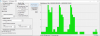
Another option would be to use CallSequitur, this would provide a quick and easy way of view your Sim Calls by analysing CDRs. It collects CDRs by hooking into the 3CX CDR service and can then analyse over any time frame you are interested in, for example:
1586938977431.png
 
Our company builds add-on products for 3CX. One of our tools is "3CX Exporter". One of the things Exporter can do is automatically capture new CDR files in real-time, parse the data in the CDR file, then place the data in SQL or MySQL. Once the data is in SQL it would be very simple to find the desired call.
 
Status
Not open for further replies.

Latest Posts

Forum statistics

Threads
111,943
Messages
589,862
Members
164,835
Latest member
Firefox Technologies