Solved How can I replace the city name with phone number?

Status
Not open for further replies.

ogrixinc

SOHO User
Joined
Nov 7, 2022
Messages
13
Reaction score
6
Hello everyone.

Please help me fix this if possible. I'm a little new to 3CX

All of our IP phones, and iPhone apps show the city name or "cell phone" before the phone number and that causes the phone number to not show at all or appear as the text rolls to the left.

Example:
when a caller calls we get "CELL PHONE ON +1647XXXXXXX" or "TORONTO ON +1647XXXXXXX"

Is there a way to make it show the phone number first? or not show the useless (in my opinion) information of city name or "cell phone" at all?
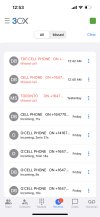
 

Attachments

  • IMG_6766DF14F7B9-1.jpeg
    IMG_6766DF14F7B9-1.jpeg
    529.9 KB · Views: 11
While you can choose to prefix, or suffix, names of DIDs and Queues within 3CX, I'm not aware of a way of rearranging the name and number, as sent by your provider. There may be a device option, on how it handles the Invite, however.

If they are a repeat caller, you can add them to the company phone-book with a new (shorter) name that will replace the generic one sent by your provider.
 
Last edited:
Hi @ogrixinc

Which provider are you using?
 
What you are seeing is what the provider is sending for a caller name and a caller number.
You cannot flip them but you can adjust what the PBX is reading.

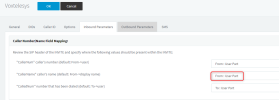
Navigate to your trunk settings / Inbound parameters and change the CallerName value to "From:User Part" and try again.

1668500227725.png


Make a note of your current settings so you can revert if you wish to.
Also please note that now even if Voxtelesys sends you the callers name, the PBX will not display it to the users.
 
What you are seeing is what the provider is sending for a caller name and a caller number.
You cannot flip them but you can adjust what the PBX is reading.

Navigate to your trunk settings / Inbound parameters and change the CallerName value to "From:User Part" and try again.

View attachment 32789


Make a note of your current settings so you can revert if you wish to.
Also please note that now even if Voxtelesys sends you the callers name, the PBX will not display it to the users.
Thank you YiannisH. Your answers to other treads solved almost all my issues when I Googled the issue. This time wasn't any different when no one else had talked about this. Much appreciated!
 
  • Like
Reactions: YiannisH_3CX
Thank you YiannisH. Your answers to other treads solved almost all my issues
I completely agree with you ,Yannis is talented (not to say others aren't) and kind guy .
 
  • Like
Reactions: YiannisH_3CX
While you can eliminate the name altogether (actual look-ups and "generic" attachments), that is not something normally considered by most, as name display is usually an additional cost feature. If it is not desired, you might want to ask your provider if they can remove it, which may save you some money.
 
Glad I could assist and thank you for the kind feedback
 
Status
Not open for further replies.

Latest Posts

Members Online Now

Forum statistics

Threads
111,831
Messages
589,276
Members
164,660
Latest member
RJenkinsROCK