- Joined
- Oct 24, 2023
- Messages
- 16
- Reaction score
- 5
I'm struggling to find out how I apply a custom phone template to Yealink T54W and T46U phones via 3CX v20.
I need to change the order of the softkeys whilst talking in a call so that the End Call button appears first on the left as the most recent update to 3CX has now added a "Shield Off" button that has gone and pushed the End call button off to a second screen.
I understand that if the PBX is 3CX hosted, that we can't apply custom templates. So I have gone and moved from 3CX hosted to an alternate cloud host. However... I still can;t see how I apply the custom template I've made.
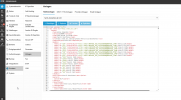
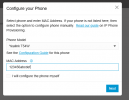
I created a copy of the yealinkT5x.ph.xml phone template. Modified the copy as editing is disabled on the built in templates. How do I now apply the modified template to the required phones? All the instructions I can see in the 3CX support / doco refers to V18.
Thanks.
I need to change the order of the softkeys whilst talking in a call so that the End Call button appears first on the left as the most recent update to 3CX has now added a "Shield Off" button that has gone and pushed the End call button off to a second screen.
I understand that if the PBX is 3CX hosted, that we can't apply custom templates. So I have gone and moved from 3CX hosted to an alternate cloud host. However... I still can;t see how I apply the custom template I've made.
I created a copy of the yealinkT5x.ph.xml phone template. Modified the copy as editing is disabled on the built in templates. How do I now apply the modified template to the required phones? All the instructions I can see in the 3CX support / doco refers to V18.
Thanks.