- Joined
- Sep 23, 2021
- Messages
- 5
- Reaction score
- 3
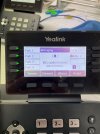
Currently, the incoming number is displayed twice, in the format listed below and also with the photo attached:
IRG 1:123456789
123456789
IRG 1 being the name of the ring group, and 123456789 being the phone number.
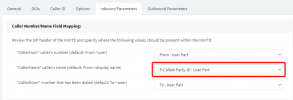
I have changed the inbound parameter "CallerName" settings to From: Display Name, which fixes this, but then it makes the name of the caller "IRG1:" in call history settings on the Yealink phone, which I do not want because you cannot see the number at first glanced, just the ring group name, which doesn't necessarily mean anything.
I am also aware of the setting in Advanced -> Contacts to remove the name feature entirely, but I don't want to disable it. I just want the number to display once instead of twice - because I want it to display certain DID names and also have auto attendant ring group names show.
Model of phone: Yealink T53W
Version of 3CX: v18
SIP Provider: Telcoinabox / iVox
Country: Australia
IRG 1:123456789
123456789
IRG 1 being the name of the ring group, and 123456789 being the phone number.
I have changed the inbound parameter "CallerName" settings to From: Display Name, which fixes this, but then it makes the name of the caller "IRG1:" in call history settings on the Yealink phone, which I do not want because you cannot see the number at first glanced, just the ring group name, which doesn't necessarily mean anything.
I am also aware of the setting in Advanced -> Contacts to remove the name feature entirely, but I don't want to disable it. I just want the number to display once instead of twice - because I want it to display certain DID names and also have auto attendant ring group names show.
Model of phone: Yealink T53W
Version of 3CX: v18
SIP Provider: Telcoinabox / iVox
Country: Australia