• We do not provide troubleshooting help for unsupported phones. Please try with a supported phone.
  • V20 Update 10 Alpha Learn more

Solved How do I enable multiple calls feature?

Status
Not open for further replies.

ivandave

New User
Joined
Oct 6, 2021
Messages
10
Reaction score
2
I need to do phone conference call yet when I try to do it it says cant do it, either hang up or enable multiple calls feature. Please can someone hhelp me, thank you
 
I need to do phone conference call yet when I try to do it it says cant do it, either hang up or enable multiple calls feature. Please can someone hhelp me, thank you
In the extension, under Forwarding Rules, for the status Available, check below there is a checkbox called "Accept Multiple Calls".

Just enabled that.
 
Hello Frederick, thank you for your reply. I already did what you said. But still its not working.
 
In the extension, under Forwarding Rules, for the status Available, check below there is a checkbox called "Accept Multiple Calls".

Just enabled that.
Hello Frederick, thank you for your reply. I already did what you said. But still its not working.
 
In Users, select the extension checkbox and click the Status button. Make sure it's in Available status.
 
In Users, select the extension checkbox and click the Status button. Make sure it's in Available status.
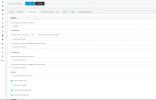
yes it is available. I have no issues with 3cx since i started using it primarily for calling outbound calls to mobile numbers. Now I need to do a conference for me to be able to talk to 2 numbers at the smae time before leaving both of them so they can continue to talk. Below is a screen shot of my setting that you mentioned above

1634409163535.png
 
yes it is available. I have no issues with 3cx since i started using it primarily for calling outbound calls to mobile numbers. Now I need to do a conference for me to be able to talk to 2 numbers at the smae time before leaving both of them so they can continue to talk. Below is a screen shot of my setting that you mentioned above

View attachment 25199
What is the conference phone you are using?
 
What is the conference phone you are using?
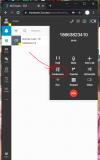
I am just using the 3cx web application to do all my outbound calls. All my calls are via 3cx web app. See picture below. I use that to try to do conference but when I dial the 2nd number in it says I cant do a conference, either i hung up the current call or enable multiple calls feature on my account.

1634409348593.png
 
I am just using the 3cx web application to do all my outbound calls. All my calls are via 3cx web app. See picture below. I use that to try to do conference but when I dial the 2nd number in it says I cant do a conference, either i hung up the current call or enable multiple calls feature on my account.

I think you are hearing a message from your trunk provider, not 3CX.

You want to make a conference with two external numbers, and your provider is asking you to enable multiple calls on their system (not on 3CX).

Just to be very clear, 3CX itself does not require you to enable multiple calls on your 3CX extension in order to make conference calls. And 3CX does not have a message that tells you anything regarding this, hence why I think you are hearing a message from your trunk provider, not from 3CX.
 
I think you are hearing a message from your trunk provider, not 3CX.

You want to make a conference with two external numbers, and your provider is asking you to enable multiple calls on their system (not on 3CX).

Just to be very clear, 3CX itself does not require you to enable multiple calls on your 3CX extension in order to make conference calls. And 3CX does not have a message that tells you anything regarding this, hence why I think you are hearing a message from your trunk provider, not from 3CX.
Hello John,

You are amazing! I tried looking at my Trunk provider and i made some tweaks there and now its working. thank you so much! By any chance is there any telling if the prompt is from 3cx or from my trunk provider?

Thank you!
 
  • Like
Reactions: Evolute IT
Hello!

Happy to hear it has been resolved :)

I use a few methods but mainly I search in Settings >> System Prompts where the 3CX messages also have searchable text

A bit more advanced but rarely needed: I run a packet capture, and analyze the audio streams to see if it is coming from my 3CX IP or my provider's IP

And over time I've become familiar enough with the 3CX voice prompts, and this also helps detect it "by ear"
 
  • Like
Reactions: Evolute IT
Status
Not open for further replies.

Members Online Now

Forum statistics

Threads
111,832
Messages
589,278
Members
164,662
Latest member
DejanMDS