Solved How do I set 3CX client as default app for "tel:" URLs?

Status
Not open for further replies.

Thom Hill

Joined
Apr 17, 2018
Messages
5
Reaction score
0
When I have a "tel:" prefixed URL Windows asks what app to use to handle the request. Windows provides a list of possible telephony apps but 3CX client is not one. I get People, Google Hangouts, Skype, Ring Central, etc. but 3CX doesn't appear on the list.
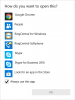
 

Attachments

  • phone apps.png
    phone apps.png
    18.2 KB · Views: 19
Yes but... this is very useful but it gets me to the same place. The last step in the tutorial asks what app to associate with the tel protocol. The 3CX client does not show in the list of apps. If I go to the app store and search for an app all I get is a book related to 3CX. Can I use a generic telephony app and somehow link it to 3CX client or maybe a registry entry?
 
Duhhhhhh! My apologies. I don't have 3CX Windows client installed. I use the web client most of the time and the machine had Windows client uninstalled. Thank you for your help.
 
Status
Not open for further replies.

Latest Posts

Forum statistics

Threads
111,885
Messages
589,545
Members
164,744
Latest member
johnblackwood1