- Joined
- Jul 22, 2019
- Messages
- 147
- Reaction score
- 44
Hello 3XC,
we have some kind of an issue with our customers using 3CX. There are different kinds of how the caller IDs or names of saved numbers are displayed.
In one case I only saved the caller ID with its name in my local contacts on 3CX.
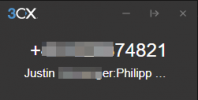
The colleague calls me and it is display with its caller ID on top and in the next line there is its name displayed. After the name, separated by ":", there is the extension inbound rule name and afterwards again the callers ID. That would be ok for us, because we can see the callers Name from the contacts in this case.
Like this:
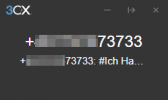
The other case, that is more often displayed, shows the caller ID twice. On top of the Dialer and again in the line below. After the second caller ID, separated by ":" again the inbound rule name and just after that you can see the callers name, as saved in the contacts, but the line is too short to read this. You can just see the name afterwards in the call list.
Like this:
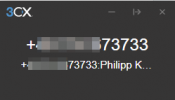
I don't know why it is sometimes with the name instead of the caller ID again but the most of the times it's the caller ID twice and the name just after the inbound rule.
In this case "#Ich Handy" would be the correct name to be displayed.
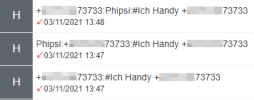
This is how both cases look in the call list. On the bottom it is the better case to be displayed and on the top of the call list it is the weired displaying, where the name is too far at the end of the line.
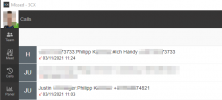
Can this be fixed, so that all numbers, that are know by the 3CX extension, will the names be displayed at first?
These are contacts in the global contacts, the own contacts, the 3CX extensions as well as the extensions saved mobile numbers.
we have some kind of an issue with our customers using 3CX. There are different kinds of how the caller IDs or names of saved numbers are displayed.
In one case I only saved the caller ID with its name in my local contacts on 3CX.
The colleague calls me and it is display with its caller ID on top and in the next line there is its name displayed. After the name, separated by ":", there is the extension inbound rule name and afterwards again the callers ID. That would be ok for us, because we can see the callers Name from the contacts in this case.
Like this:
The other case, that is more often displayed, shows the caller ID twice. On top of the Dialer and again in the line below. After the second caller ID, separated by ":" again the inbound rule name and just after that you can see the callers name, as saved in the contacts, but the line is too short to read this. You can just see the name afterwards in the call list.
Like this:
I don't know why it is sometimes with the name instead of the caller ID again but the most of the times it's the caller ID twice and the name just after the inbound rule.
In this case "#Ich Handy" would be the correct name to be displayed.
This is how both cases look in the call list. On the bottom it is the better case to be displayed and on the top of the call list it is the weired displaying, where the name is too far at the end of the line.
Can this be fixed, so that all numbers, that are know by the 3CX extension, will the names be displayed at first?
These are contacts in the global contacts, the own contacts, the 3CX extensions as well as the extensions saved mobile numbers.