Solved How to backup on different drive than C:? (for example, mapped drive Z:)

Status
Not open for further replies.

VictorSP

Platinum Partner
Advanced Certified
Joined
Sep 6, 2016
Messages
115
Reaction score
28
Hello,

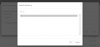
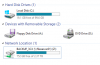
Is it possible to use a mapped drive on Windows as a backup location? I cannot choose it, only appears C:

13462

13463

Regards,
Víctor
 
Hi

at the moment this is not possible and i dont think mapped drives ever will be.

Once update 4 is released you will be able to back up to SMB shares.

So, either set up a backup to FTP or wait for update 4.

You might even be able to add an iSCSI to your Windows machine and have 3CX see it that way, i've never tested.
 
  • Like
Reactions: VictorSP
Hi

at the moment this is not possible and i dont think mapped drives ever will be.

Once update 4 is released you will be able to back up to SMB shares.

So, either set up a backup to FTP or wait for update 4.

You might even be able to add an iSCSI to your Windows machine and have 3CX see it that way, i've never tested.

Thanks for your reply. Same info from 3CX Support Team.
 
  • Like
Reactions: JohnS_3CX
Yes, either local drives or block-level write access drives like SAN / iSCSI.

File-level access like NAS is not supported (writes are not confirmed, you risk data loss to some degree).
 
  • Like
Reactions: Evolute IT
Status
Not open for further replies.

Latest Posts

Forum statistics

Threads
111,934
Messages
589,822
Members
164,814
Latest member
Ruben756