How to change call handling on weekends.

garrick.cobcroft@gsconsul

Silver Partner
Joined
Sep 1, 2022
Messages
75
Reaction score
16
Hi, my client has retail operations 7 days a week. They would like the weekday call handling to go directly to the call queue as it does now, but change so that the weekend goes to a digital receptionist. How can this be achieved please?
 
You need to configure the Office hours accordingly and assign the Department to the Queue. Then set in the Queue when Oout Of Office to route to the IVR.
Another Option can also be the Time Based Routing Script to configure with specific hours as well.
 
You need to configure the Office hours accordingly and assign the Department to the Queue. Then set in the Queue when Oout Of Office to route to the IVR.
But it's not out of office. They want to route to the IVR during specific office hours. Out of Office to continue to go to message bank as it does now.
 
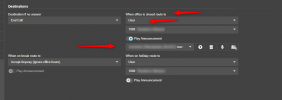
In the Queue though you can select when Out Of Office to route the calls to the destination IVR with announcement:
1770873396436.png
 
Yes, but won't this override what happens when the office is actually closed? In this instance, the office is open on weekends, they just want different call handling on the weekend.

I'm just checking out the time based call script now, I think that is the solution
 
Yes most probably you will need to proceed with the script for more detailed routing.
 
Is there a better example of configuring the hours in the call script? That part is really confusing how it's written.
 
It is a C# code and you only need to apply the hours and destination there.
 
Yes, I see that. But when I put the following as the hours.

{ DayOfWeek.Saturday, new Schedule.PeriodOfDay(TimeSpan.FromHours(8.5), TimeSpan.FromHours(17)) },
{ DayOfWeek.Sunday, new Schedule.PeriodOfDay(TimeSpan.FromHours(9), TimeSpan.FromHours(12)) }

It just drops the call. Obviously today is Thursday, so I don't know what I redid the script with the default code, and just changed the destination to 814, and the same result occurs, 1 ring then the call is dropped?
 
Check also a complete example here for more information.
 
Yes, I've cut and paste that example, just changing the destination extension, and it causes the PBX to drop the call after 1 ring.

I've now uploaded a custom script created with the call flow designer, and that seems to work for office hours, so I'll test on the weekend to check
 
  • Like
Reactions: TheodorosG_3CX
@garrick.cobcroft@gsconsul

Honestly, if you're not very familiar with CFD, why not use the 3CX built-in tools like before?

In such cases we've always set up a dummy extension which receives the DID. This dummy extension has its own business and break times and automatically switches its status accordingly. Even if the dummy extension isn't logged in, it works, since years. This gives you a one-of-three switch (office hours, break time, out-of-office hours) that allows you to redirect calls at user-defined times. If there are only a few DIDs you won't have any problems with future FUP rules.
 
@garrick.cobcroft@gsconsul

Honestly, if you're not very familiar with CFD, why not use the 3CX built-in tools like before?

In such cases we've always set up a dummy extension which receives the DID. This dummy extension has its own business and break times and automatically switches its status accordingly. Even if the dummy extension isn't logged in, it works, since years. This gives you a one-of-three switch (office hours, break time, out-of-office hours) that allows you to redirect calls at user-defined times. If there are only a few DIDs you won't have any problems with future FUP rules.
Thanks heaps mate. This is exactly how I used to do it in the old days with key systems, but didn't think to use the dummy extension. I'll see how the CFD goes, and if that fails I'll go back to doing it this way. There is only one DID to be concerned with, so it should be straight forward
 

Forum statistics

Threads
111,953
Messages
589,913
Members
164,848
Latest member
latoya@bautistafamilycare