How to change email address on License Settings

Status
Not open for further replies.

diegocardenas70

Bronze Partner
Joined
May 24, 2019
Messages
2
Reaction score
0
Hello All!

We have a client running verison v16.0.16 and need to upgrade them to v18 we are going to trade in the license but I noticed that the email in the Product Details Page is the wrong one.

How can we edit and update this record. This is needed to get the email confirmation when peroforming the upgrade,

Thanks

DC70
 
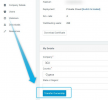
Are you perhaps talking about the Registration details? If yes, the email seen there is the email under which the License Key is registered. To change it, you would have to access the customer portal using that account (login with that email) and transfer it to another one that also has a 3CX customer portal account:

From the old customer portal:
1642751393651.png


This is needed to get the email confirmation when peroforming the upgrade,
That said, the email notification is not sent to this email though. It is actually sent to the PBX's administrator email which can be set by accessing the Management Console of the said PBX and navigating to "Settings >> Email >> Notifications".
 
Thanks ChrisC,

But the email is not correct on the customer portal, so we cannot get access to it nor initial a "forgot password" to reset it? Is there any other way.
Can we still upgrade to v18 ?
 
Hi @diegocardenas70 ,

In a PM, send me the first 8 digits of your License Key of this system and I will see if there is assistance I can offer you.
 
Status
Not open for further replies.

Forum statistics

Threads
111,974
Messages
590,083
Members
164,901
Latest member
Silent_Guru