how to configure 3cx with 2 NICs

Status
Not open for further replies.

rizzz

Joined
Jun 25, 2009
Messages
29
Reaction score
0
Hi,

We have in our office a 3cx system that works well for internal call.

And we want now to connect it to a voip provider.

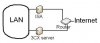
Because we have ISA in our office, i think to adopt this architecture.

Can it work?

And how do i must configure 3cx server?

Best regards,
 

Attachments

  • 2 NICs.jpg
    2 NICs.jpg
    11 KB · Views: 1,484
Put 3CX on the LAN with a single NIC and publish it with the ISA server after you have defined all the ports for it in ISA.
A single NIC configuration is always much easier unless you have an absolute requirement for 2 NIC's
 
discovery1 said:
Put 3CX on the LAN with a single NIC and publish it with the ISA server after you have defined all the ports for it in ISA.
A single NIC configuration is always much easier unless you have an absolute requirement for 2 NIC's

Have you test it? does it work well?

They sayed in the wiki 3cx that 3cx is not supported by ISA.

How can i publish it? where can i find a good tuto? cause i'm new with ISA

I was thinking to use 2 NICs cause i think it is the best way to avoid having a problem with ISA.
 
I have 3CX setup on 2 NIC, and there is no reason why it can't be done. If you use the phone provisioning you will need to select what IP the phone is going to be contacting.

My setup is like this:

NIC 1 - 10.10.165.10 > POE Switch > Phones | This network runs on Cbeyond with SIP Connect
Windows Server 2008 > Domain Controller > 3CX
NIC 2 - 10.5.165.10 - Switch > Computers > 3CX Assistant | This network is ATT Elite DSL

You will also need to make sure that your primary NIC is setup first in 3CX, this will insure that it connects to the SIP provider correctly.
 
tpinnovations said:
My setup is like this:

NIC 1 - 10.10.165.10 > POE Switch > Phones | This network runs on Cbeyond with SIP Connect
Windows Server 2008 > Domain Controller > 3CX
NIC 2 - 10.5.165.10 - Switch > Computers > 3CX Assistant | This network is ATT Elite DSL

Have you try to install softphone on the computers? cause it is what i want to do.

tpinnovations said:
You will also need to make sure that your primary NIC is setup first in 3CX

I'm not sure i understand what do you mean by this. How can i do it?
 
Only enable or install the first NIC in the 3CX machine then install 3CX.
Once 3CX is configured then enable or install the second NIC and set up your second network and routing
 
I try it and it works well.

:twisted: Now the problem is my 3cx server is exposed directly to the internet. :twisted:

What firewall do you advice me to install on the 3cx server? :mrgreen:
 
Your diagram shows that your 3CX PC is behind a router so you aren't completely exposed if you are only forwarding the required ports. You could try the "free" version of Zonealarm.
 
leejor said:
You could try the "free" version of Zonealarm.

Does free version for win 2003 exist? They just say it's compatible with XP and vista and nothing about 2003.

I read that zone alarm is protecting pc when navigating on internet.
I never use my 3cx server for navigating.

Am i safe when not navigating?

I don't know if it exists but i'm searching for a firewall that protecting my pc when not navigating.
 
You could use filtering on the Win 2k3 server but in all honesty your current setup is going to cause you pain and take a long time to get working correctly if at all.
Invest in a proper firewall instead of the router and install or reconfigure ISA as a caching proxy for clients on the LAN and use the firewall to forward the ports to the 3CX server on the LAN (with a single NIC)
 
Status
Not open for further replies.

Latest Posts

Forum statistics

Threads
111,884
Messages
589,542
Members
164,742
Latest member
Zain101