How to fix the CDR timezone?

Status
Not open for further replies.

Paul-2024

Customer
Joined
Feb 16, 2024
Messages
48
Reaction score
12
My hosted setup is using Eastern Time in its settings however the CDR call times are ahead of EST by 3 hours.
What's the server location btw?
 
3CX always saves the time in UTC. There is no way to change that. You will have to manipulate the date/time in your consuming application. As a side note, 3CX saves dates in UTC so that you are starting from a known time zone. This means you can always calculate the correct time regardless of YOUR time zone, or the time zone of the 3CX server. This is a "best practice" approach to saving date/times in log files.
 
  • Like
Reactions: Evolute IT
Hmmm, something is off then, for example a call from 2:19 PM (as seen in the call log report) has a UTC value of 5:30 PM in the CDR, which does not match the 5 hours difference between those two timezones.
 
What timezone did you select in the system options? There are multiple EST because of DST.
 
I have -5:00 United States - Eastern Time selected, the call log does reflect the correct time based on that setting though.

I should have mentioned I'm actually using the API, not the CDR server so my bad on that...

Code:
 "@odata.context": "https://domain.3cx.us/xapi/v1/$metadata#CallHistoryView",
    "value": [
        {
            "SegmentId": 146,
            "SegmentStartTime": "2024-02-08T11:00:13.301558Z",
            "SegmentEndTime": "2024-02-08T11:00:13.473239Z",
            "SegmentActionId": 6,
            "SegmentType": 1,
 
I have -5:00 United States - Eastern Time selected, the call log does reflect the correct time based on that setting though.

I should have mentioned I'm actually using the API, not the CDR server so my bad on that...

Code:
 "@odata.context": "https://domain.3cx.us/xapi/v1/$metadata#CallHistoryView",
    "value": [
        {
            "SegmentId": 146,
            "SegmentStartTime": "2024-02-08T11:00:13.301558Z",
            "SegmentEndTime": "2024-02-08T11:00:13.473239Z",
            "SegmentActionId": 6,
            "SegmentType": 1,
So the XAPI log is not using the right timezone?

That's interesting. I'll check mine and see.
 
So the XAPI log is not using the right timezone?

That's interesting. I'll check mine and see.
Precisely, in my case its off when comparing to the dashboard call log.
 
Definitely sounds like a bug or something. Checked mine and the timezone in the log is UTC, 5h ahead of my EST time.

Can you switch your timezone to the EST Canada Montreal, just for fun? Also, what timezone is your computer using?
 
Definitely sounds like a bug or something. Checked mine and the timezone in the log is UTC, 5h ahead of my EST time.

Can you switch your timezone to the EST Canada Montreal, just for fun? Also, what timezone is your computer using?
I did try another timezone, like -3, restarted all services and the api results remained unchanged, so seams to be completely ignoring that setting.
 
@Charles_3CX I confirmed that mine is fine, but I am self-hosted. Is the XAPI data influenced by the system timezone or anything like that?

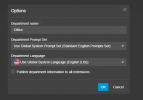
Paul, make sure your departments are using the system timezone, and that they all correspond:
1709732152116.png
 
@Charles_3CX I confirmed that mine is fine, but I am self-hosted. Is the XAPI data influenced by the system timezone or anything like that?

Paul, make sure your departments are using the system timezone, and that they all correspond:
View attachment 40120
Being hosted by 3CX is apparently the issue.

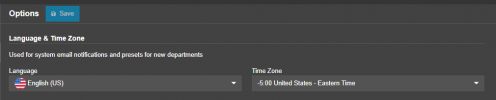
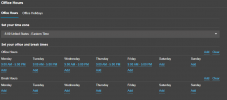
I don't have a timezone setting for the departments actually.

1709732371503.png

1709732393270.png
 
Department timezone is under Office Hours.
 
What's your local PC timezone? Same I'm guessing?
 
I would open a ticket with 3CX. I can open that on your behalf if needed since we're linked.
 
Status
Not open for further replies.

Forum statistics

Threads
112,285
Messages
591,708
Members
165,408
Latest member
tom.walker@blackcountryra