How to force Google SSO login

Status
Not open for further replies.

kusig

Customer
Joined
May 18, 2015
Messages
24
Reaction score
1
We successfully activated Google SSO and users could now choose their company google workspace account for the 3CX Webclient login. So far so perfect.

But how could we now disable any non Google-SSO login, this option is still present on the login view for the webclient but due to security constraints we don't want to have this login option anymore. I mean, what sense does it make to have 2FA SSO with an external identity provider but still allow the local non secure login at the same time ..... (One could ask what did the product manager smoke here :))

There must be an option per user to force this in order to have a secure system!
 
You would have to reset all user passwords to something obscene and then disable them from being able to change their password.
 
  • Like
Reactions: SweetAction
You would have to reset all user passwords to something obscene and then disable them from being able to change their password.
Of course, but come on, we are talking about a professional product here for which we pay. Your workaround leaves the accounts still open to local logins in case of any "hacks". There must be an option to disable the local authentication in general or at least for dedicated users.
 
For now, there is no other option than what you requested above, and we don't have any information if this will be in the future.
When it comes to the security, you could check our blog posts on "Don’t be “THAT” Guy", and there are 4 volumes that advise on the security part what the system can offer and the best practices.

Please note that feature requests should only be requested from the ideas section of the forum. You could post your idea in the right section of the forum, however, kindly note that only Gold, Platinum and Titanium partners can post idea requests.
Have a nice day
 
  • Like
Reactions: Evolute IT
For now, there is no other option than what you requested above, and we don't have any information if this will be in the future.
When it comes to the security, you could check our blog posts on "Don’t be “THAT” Guy", and there are 4 volumes that advise on the security part what the system can offer and the best practices.

Please note that feature requests should only be requested from the ideas section of the forum. You could post your idea in the right section of the forum, however, kindly note that only Gold, Platinum and Titanium partners can post idea requests.
Have a nice day
Thanks. However, we are very aware of security and this is a security hole which needs to be solved. It's neither an idea nor a platinum customer thing.
 
Thank you for the feedback.
 
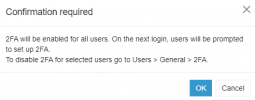
in v20 you can set 2FA for local logins

1712581559456.png

It's a pain because you have to do it extension by extension, but it's better then being hacked...
 
  • Like
Reactions: Evolute IT
@SweetAction Yes this is expected as each user has to individual configure it.
 
@SweetAction Yes this is expected as each user has to individual configure it.
Right, but for a company wishing to ensure that everyone has 2FA, they have to login 1 by 1 to each extension. There is no current way to disable local login nor a way to force SSO. This is what kusig was asking above.
 
Everyone is right, hope @kusig find all of the above informative.
Have a nice day
 
Status
Not open for further replies.

Latest Posts

Forum statistics

Threads
111,953
Messages
589,915
Members
164,850
Latest member
masvty