Baldog Customer Joined Feb 9, 2021 Messages 22 Reaction score 5 Nov 2, 2021 #1 we have a couple of phones on the front desk and different users use them. I cant find a way to log out of the desktop app at all?
we have a couple of phones on the front desk and different users use them. I cant find a way to log out of the desktop app at all?
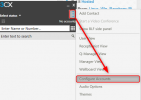
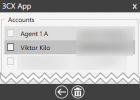
VasilisV_3CX Customer Joined Jan 12, 2021 Messages 4,360 Reaction score 951 Nov 2, 2021 #2 Hi @Baldog, If you want to log out or change the login, you'll need to click on the three dots at the top right of the Windows client, then Configure Accounts. You will see the list of Accounts added to the Windows Client, you can tick one, or untick all. Ticking one will log another user in.
Hi @Baldog, If you want to log out or change the login, you'll need to click on the three dots at the top right of the Windows client, then Configure Accounts. You will see the list of Accounts added to the Windows Client, you can tick one, or untick all. Ticking one will log another user in.
Baldog Customer Joined Feb 9, 2021 Messages 22 Reaction score 5 Nov 2, 2021 #3 I dont seem to have those dots in the 3cx app? can you post a full screen image?
VasilisV_3CX Customer Joined Jan 12, 2021 Messages 4,360 Reaction score 951 Nov 2, 2021 #4 Hi @Baldog, To clarify, are you referring to the 3CX Windows App, or the 3CX Desktop App?
Baldog Customer Joined Feb 9, 2021 Messages 22 Reaction score 5 Nov 2, 2021 #5 Oh sorry, i don't know the difference i thought they were the same. Its the one we have downloaded and installed on to windows 10
Oh sorry, i don't know the difference i thought they were the same. Its the one we have downloaded and installed on to windows 10
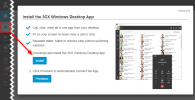
VasilisV_3CX Customer Joined Jan 12, 2021 Messages 4,360 Reaction score 951 Nov 2, 2021 #6 Hi @Baldog, If you're using a v18 PBX, and you've installed from this interface: Then it's the Desktop App. Both install onto your Windows PC. If that's the case, coming back to your original question: You just need to log in on the Web Client and click the same button as shown in the image above, then click Provision instead of Install. Reactions: tulio.filho
Hi @Baldog, If you're using a v18 PBX, and you've installed from this interface: Then it's the Desktop App. Both install onto your Windows PC. If that's the case, coming back to your original question: You just need to log in on the Web Client and click the same button as shown in the image above, then click Provision instead of Install.
Baldog Customer Joined Feb 9, 2021 Messages 22 Reaction score 5 Nov 2, 2021 #7 ah ok, we'll uninstall the desktop app and just continue to use the web as there seems to be no benefit in having it if its not a standalone app. Thank you for your help
ah ok, we'll uninstall the desktop app and just continue to use the web as there seems to be no benefit in having it if its not a standalone app. Thank you for your help
VasilisV_3CX Customer Joined Jan 12, 2021 Messages 4,360 Reaction score 951 Nov 2, 2021 #8 Hi again @Baldog, Sure thing, just some food for thought: https://www.3cx.com/blog/unified-communications/3cx-windows-desktop-app-review/ https://www.3cx.com/blog/releases/v18-alpha-5/ Reactions: Baldog
Hi again @Baldog, Sure thing, just some food for thought: https://www.3cx.com/blog/unified-communications/3cx-windows-desktop-app-review/ https://www.3cx.com/blog/releases/v18-alpha-5/