How to make two different prefixes

Status
Not open for further replies.

koex

Customer
Joined
Jun 12, 2015
Messages
13
Reaction score
0
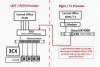
Hello guys. I am looking for some solution. There are total 24 trunks. And I want to make 16 trunk go with prefix #9 and I want to make other 8 trunks go with prefix #8 for both of them works for all of the phones in premises. So I made two different inbound rule FXO 1 and FXO 2 . And I made two different outbound rule and each one has prefix #9 and #8. But when I make a call outbound #9 it works but #8 does not working. Am I missing something? The reason I want to separate this because those 8 trunks from different provider with T1 secured line. client want to separate that secured line. Please give me an advice please !!!! Thanks.
 

Attachments

  • diagram.jpg
    diagram.jpg
    276.9 KB · Views: 13
As long as each group of 16 trunks, is a separate trunk group in 3CX, then it will be the outbound rules that choose which group calls go out on. Your diagram seem to indicate that they all pass through one gateway. Has the gateway been divided into two trunk groups? It would have to be as well, otherwise it will be the gateway deciding which trunk to send the call out on.

Had you considered a T1/ ISDN gateway, to bring that group into 3CX as a separate trunk group.
 
  • Like
Reactions: koex
As long as each group of 16 trunks, is a separate trunk group in 3CX, then it will be the outbound rules that choose which group calls go out on. Your diagram seem to indicate that they all pass through one gateway. Has the gateway been divided into two trunk groups? It would have to be as well, otherwise it will be the gateway deciding which trunk to send the call out on.

Had you considered a T1/ ISDN gateway, to bring that group into 3CX as a separate trunk group.

Sorry that diagram is old one ..... I separate the trunk group with separate gateway. But still happen :*( Maybe some small mistake somewhere.. I will redo everything tomorrow. Thanks !
 
Place a call that doesn't route the way you want it to, then check the 3CX Activity Log to see which outbound rule the call is using. That may give you a clue as to what is (perhaps) incorrect, in your outbound rules
 
Status
Not open for further replies.

Latest Posts

Forum statistics

Threads
111,990
Messages
590,161
Members
164,925
Latest member
batarong