


- Joined
- Jan 13, 2023
- Messages
- 6
- Reaction score
- 0
Hi there.
On-Premise 3CX V18.0 Update 5 (Build 418)
Product: Enterprise Annual.
Summary: We have a 3CX System installed on Windows on a 50GB partition. As space is limited, we decided to edit the recordings location and set it to a mounted S3 Bucket. The S3 bucket is actually mounted on a subfolder within the C: drive and all files really resides on the cloud bucket, only the metadata resides on the C: drive, which allows 3CX to list all available recordings, and then upon listening a recording, the file is automatically downloaded from the S3 bucket software.
Ex. C:\3cx\recordings --> This folder contains all recordings metadata, but the audio files resides in the cloud.
Issue: 3CX automatically disables the recordings because is detects the recordings have reached eg. 68GB / 50GB, but in truth that 68GB doesnt reside on the local disk, it's on the cloud storage.
Question: We tried editing the parameters "STOP_RECORDINGS" and set it to 0, or "QUOTA_STOP_RECORDINGS" to 0, and it momenratily enables the recordings back, but a few minutes later it again disabled it. Is there a way to permanently force the recording to be enabled and stop quota monitoring ?
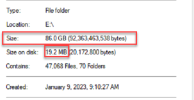
See below how the recording size on the disk is merely 20 MB.
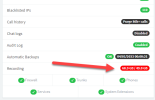
3CX then proceeed to warns us about quota reached.
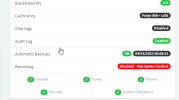
Then it disable all recordings
Thank you
On-Premise 3CX V18.0 Update 5 (Build 418)
Product: Enterprise Annual.
Summary: We have a 3CX System installed on Windows on a 50GB partition. As space is limited, we decided to edit the recordings location and set it to a mounted S3 Bucket. The S3 bucket is actually mounted on a subfolder within the C: drive and all files really resides on the cloud bucket, only the metadata resides on the C: drive, which allows 3CX to list all available recordings, and then upon listening a recording, the file is automatically downloaded from the S3 bucket software.
Ex. C:\3cx\recordings --> This folder contains all recordings metadata, but the audio files resides in the cloud.
Issue: 3CX automatically disables the recordings because is detects the recordings have reached eg. 68GB / 50GB, but in truth that 68GB doesnt reside on the local disk, it's on the cloud storage.
Question: We tried editing the parameters "STOP_RECORDINGS" and set it to 0, or "QUOTA_STOP_RECORDINGS" to 0, and it momenratily enables the recordings back, but a few minutes later it again disabled it. Is there a way to permanently force the recording to be enabled and stop quota monitoring ?
See below how the recording size on the disk is merely 20 MB.
3CX then proceeed to warns us about quota reached.
Then it disable all recordings
Thank you


