How to put a call on hold during an unattended transfer at the target extension?

Status
Not open for further replies.

aleksbor

Bronze Partner
Joined
Mar 9, 2022
Messages
22
Reaction score
5
Hello All,

Maybe you can help us. Is there a way to transfer a call to another extension and automatically place the caller on hold?
Perhaps shared parking is the answer, but I've only found people discussing a web client pick-up. Can we pick up a parked call using a phone?
 
Last edited:
Regarding your question and when transferring a call, the caller should be automatically put on hold when pressing the transfer button. Please porvide more information on what you are using to take calls, as in which endpoints are in use and the process you are using to transfer calls
 
Hello Charles, how do we let the target extension phone pick up the on-hold/parked call, perhaps avoiding the whole shared parking scenario - direct transfer with a pick-up option of some sort?
 
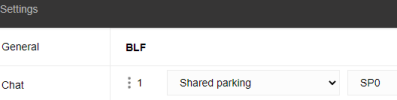
Yes, the shared parking:
1659550440008.png
 
Hello Charles, how do we let the target extension phone pick up the on-hold/parked call, perhaps avoiding the whole shared parking scenario - direct transfer with a pick-up option of some sort?
With regards to shared parking and are using supported IP phones or the desktop apps, then configure shared parking keys for the same parking slots on your extensions, then simply press the shared parking BLF key to park a call and to pick up a call from shared parking have the same parking slots configured on the other extensions to pick up the call by pressing the shared parking BLF key that call was parked in, these would be lit up red when a call is parked.
 
Status
Not open for further replies.

Forum statistics

Threads
111,974
Messages
590,083
Members
164,899
Latest member
mazet