How to ring another extension without breaking a round-robin?

Status
Not open for further replies.

admin2109

New User
Joined
Feb 11, 2022
Messages
2
Reaction score
0
Hi there,

We have a round-robin with 8 phones in our call queue. How do I set up an extension so that incoming calls do their rounds while simultaneously ringing the new extension, and the new extension needs to be absent from the round-robin queue?

Thanks,
admin
 
I'm afraid I'm not 100% sure what you mean. When using the Round Robin polling strategy in a queue, the extensions will get polled for a call based on their order in the Call Queue. What do you mean by new extension? Can you provide a call flow scenario example where you face this issue and elaborate a bit more so that we can hopefully provide a more definite answer?
 
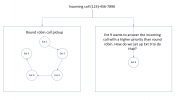
Thanks Chris, here is an example, I have attached a picture of a sample call flow too.

There's a round-robin poll for a call in office space #1. We have another extension in office space #2 who wants their phone to ring and answer any of the incoming calls during #1's poll. How do we set that up?
 

Attachments

  • Picture1.png
    Picture1.png
    30.8 KB · Views: 20
So you want Extension 9 to always ring first? If yes, you could maybe use "Skill Based Routing Round Robin" and the set Extension 9 as Skill Group 1 and the rest extensions as Skill Group 2. This way, Ext. 9 will always ring first and calls will only go to Skill Group 2 if Ext. 9 is busy.
 
I just realized I may have misunderstood the call flow you're looking for.

If what you want to achieve is have Ext. 9 ring continuously while having the call also go through the other extensions at the same time, I'm afraid there's no built-in mechanism within 3CX to allow you to do this.

You could potentially get a call flow behavior similar to what you want by utilizing ring groups, though I must say upfront that the below configuration is by no means the way ring groups were intended to be used so please proceed at your own discretion:

1. Create two Ring Groups. Let's say RG A and RG B.
2. Set RG A to Ring all and RG B to Prioritized Hunt.
3. Create a dummy extension, let's say ext. 10 and set it's mobile number to be RG Bs extension number.
4. Go into extension 10 Forwarding rules and enable "Ring my mobile simultaneously", click on OK.
5. Add extension 10 and extension 9 to RG A.
6. Add the rest of extensions to RG B.
7. Set the Inbound Rule to route calls to RG A.

8. Remember to set the Ring Group ring times so they match and also set extension 10's ring time for the available profile to match the Ring Group ring times too.
 
Status
Not open for further replies.

Forum statistics

Threads
111,974
Messages
590,083
Members
164,901
Latest member
Silent_Guru