How to see all clients connexion?

Status
Not open for further replies.

dams

Customer
Basic Certified
Joined
Mar 18, 2020
Messages
43
Reaction score
43
Good evening,

1) I would like to know if there is a command or a solution to see (all) the clients connected to the IPBX.
On the Asterisk IPBX, there is the command "sip show peers".

I know that on the admin interface, there is the "phones" page, however you don't see all the clients (for example, you don't see the connections from a smartphone), I use both the Desktop App and on my smartphone, but only the Desktop App is shown (or the webapp, but never the IOS or Android app)

2) I'm asking this question because I have a user who stays "online" while his computer is turned off, and when I call, the call doesn't go directly to the answering machine but rings in a void (like if the phone was online somewhere on the planet)

Do you have an idea?
 
As mentioned in previous post, it's probably because you've got "ring mobile simultaneously" enabled.
 
The phones section is indeed the only place to check for registered extensions/endpoints, but do bear in mind that not all endpoints are visible at all times because not all keep an active registration such as the 3CX Mobile clients because they work through PUSH.

I'd check what @kieferschild mentioned first.
 
An Android or IOS phone is visible in the phones list when they've opened the app.
 
Thanks for your help, unfortunaly it's not solved

Now, it's not only one user but other users have the same behaviour.


for "ring mobile simultaneously" this feature is off

For the exemple
on the admin interface, the user appears registered on "users" page (green dot)
1646986214701.png

but no phone connected for 303 on the "phones" page.

This user (303) don't use smartphone.

On the user list (desktop app), 303 is green (online) but If I send to a chat message, the send/read tick stay in gray (not delivered)
1646986391035.png
 
Thanks for your help, unfortunaly it's not solved

Now, it's not only one user but other users have the same behaviour.


for "ring mobile simultaneously" this feature is off

For the exemple
on the admin interface, the user appears registered on "users" page (green dot)
View attachment 28576

but no phone connected for 303 on the "phones" page.

This user (303) don't use smartphone.

On the user list (desktop app), 303 is green (online) but If I send to a chat message, the send/read tick stay in gray (not delivered)
View attachment 28577
Do you have an sync with Microsoft 365 ?
 
no sync with MS 365

Again, that's appears since some days, I'm thinking about a side effect next a 3cx update
 
Again, that's appears since some days, I'm thinking about a side effect next a 3cx update
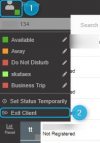
If you're running 3CX V18 U3 do note that with the introduction of PUSH notification to the webclient and PWA client, the extension will show as registered even after you've closed the browser or tab and this is probably why you're seeing this behavior. What you should do if you want to completely exit the client is use the "Exit Client" option in the menu:
1646993569855.png

Try logging into the extension's webclient and the use "Exit Client" to close and let me know if it goes red in the Management Console.
 
Yes it was exactly that

The new feature PUSH notification leaves online users
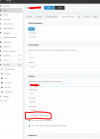
I have to unckeck "Unable push notification" for each user

Thanks for your help

1647008517511.png
 
  • Like
Reactions: ChrisC_3CX
For my first question, any command line to see all registered phone ?
 
The new feature PUSH notification leaves online users
I have to unckeck "Unable push notification" for each user
That should work just find but do remember that this will completely prevent users from receiving calls on the mobile apps. If they are not using them at all this should not be a problem.

For my first question, any command line to see all registered phone ?
I'm afraid there is no such command.
 
Yes it was exactly that

The new feature PUSH notification leaves online users
I have to unckeck "Unable push notification" for each user

Thanks for your help

View attachment 28603
Thanks I was looking for this option as well although by turning this off, the users dont get that chrome push notification obviously which is helpful to know who is calling without opening up the PWA (call centre environment).
I wish there was some sort of happy median, it doesnt make a whole lot of sense to me why keeping PUSH notifications enabled keeps the user as online when there is no endpoint.
 
I see your point however PUSH registration means that the extension must also stay registered even if the app is closed so that it can still receive calls. One of the reasons being battery optimization for the 3CX mobile apps. If this were not the case, we would have to have the mobile apps keep an active registration with the PBX to keep the extension registered and increase energy consumption.
 
  • Like
Reactions: Wesley Telecomlijn
Status
Not open for further replies.

Forum statistics

Threads
111,974
Messages
590,083
Members
164,900
Latest member
Silent_Guru