Solved How to select the preference to IPv6?

Status
Not open for further replies.

WifxMain

Silver Partner
Joined
Mar 27, 2021
Messages
45
Reaction score
14
We deploy our new customers with 3CX servers that are fully IPv6 enabled.
The desktop phones work 100% with IPv6 (Yealink).

Everything works fine, except for Windows and iOS applications that only communicate with the server in IPv4 for SIP signaling and RTP.

I can't find a way to change the preference to IPv6 for the applications.

If I disable IPv4 on a PC, I get a registration error.
I can ping the server and the server can ping the PC.

How to do it?

Best regards,
Marc
 
IPv6 is Supported for both the Windows and iOS clients so it should've worked provided that everything is in order network wise.

• Are these clients remote or local to the 3CX PBX?
• Is the PBX configured only with a IPv6 IP?
• What can you see if you go to Management Console >> Extensions >> Edit >> Phone Provisioning >> 3CX App >> Interface?
• When you say you ping between server and pc I assume you mean via ipv6 correct?
• You say you have this issue with Windows and iOS clients, have you tested android clients as well? If yes, have you tested them on the same exact network as the iOS clients connect to?
• By Windows clients, do you mean the Windows App aka 3CX Phone for Windows or the new 3CX Desktop App? What happens when you try the webclient?
 
IPv6 is Supported for both the Windows and iOS clients so it should've worked provided that everything is in order network wise.

• Are these clients remote or local to the 3CX PBX?
• Is the PBX configured only with a IPv6 IP?
• What can you see if you go to Management Console >> Extensions >> Edit >> Phone Provisioning >> 3CX App >> Interface?
• When you say you ping between server and pc I assume you mean via ipv6 correct?
• You say you have this issue with Windows and iOS clients, have you tested android clients as well? If yes, have you tested them on the same exact network as the iOS clients connect to?
• By Windows clients, do you mean the Windows App aka 3CX Phone for Windows or the new 3CX Desktop App? What happens when you try the webclient?
Hello Chris,

Thank you for you answer.

- These clients are remote.
- The PBX is configured for both IPv6 and IPv4.
- I can see the host name of the PBX, if I do an nslookup on the hostname, it return both IPv4 and IPv6 address.
- Yes, I mean IPv6 (but IPv4 work as well).
- No, I did not test Android, should I ?
- I tried with 2 different network ( office and home) same results.
I see two connections from the app to the PBX, one using IPv6 on port 5001 and the other one using IPv4 on port 5061 (TLS in enabled).
-It is the 3CX App for Windows that you can download from the e-mail invite.
 
- I can see the host name of the PBX, if I do an nslookup on the hostname, it return both IPv4 and IPv6 address.
Try selecting the IPv6 Address there, then reprovision devices.
Then at least internally while on the same network, it should use the IPv6 address.

If External, it will probaby depend on the network you are at the time.
 
Try selecting the IPv6 Address there, then reprovision devices.
Then at least internally while on the same network, it should use the IPv6 address.

If External, it will probaby depend on the network you are at the time.
I did it :
- Same issue, I see two connections from the app to the PBX, one using IPv6 on port 5001 and the other one using IPv4 on port 5061.
If I turn off IPv4, registration error on the app.

Edit : I have a Yealink W60B and a Yealink T54W, they are working fine with IPv6 on the same network as the app.
Provisionning, RTP and signaling, everything goes thru IPv6.
 
I did it :
- Same issue, I see two connections from the app to the PBX, one using IPv6 on port 5001 and the other one using IPv4 on port 5061.
If I turn off IPv4, registration error on the app.

Edit : I have a Yealink W60B and a Yealink T54W, they are working fine with IPv6 on the same network as the app.
Provisionning, RTP and signaling, everything goes thru IPv6.
For the IOS client, I am pretty sure you should only see traffic to the Tunnel Port (default 5090), by the time you are seeing traffic to 5060/5061, am I guessing correctly that you are using the 'legacy' Windows client?

Have you tried the new Windows Desktop App to see if this uses IPv6 as you expect?
Also can you confirm what happens with the IOS/Android App?
 
For the IOS client, I am pretty sure you should only see traffic to the Tunnel Port (default 5090), by the time you are seeing traffic to 5060/5061, am I guessing correctly that you are using the 'legacy' Windows client?

Have you tried the new Windows Desktop App to see if this uses IPv6 as you expect?
Also can you confirm what happens with the IOS/Android App?

Ok, I found where the problem is ...
If you use the link in the Welcome e-mail, it download and install the old version 16 app that does not work with IPv6.
If you use the new Desktop app V18 that you download from the Webclient, it work perfectly with IPv6.
This is all very confusing.
You also need to do the provisioning from the Webclient, because it seems that the provisioning file received in the welcome email does not work with the V18 application.
Now I'll search to understand if the problem is the same with Android and IOS applications.

Edit : It work with IPv6 and Android.
 
Last edited:
If you use the link in the Welcome e-mail, it download and install the old version 16 app that does not work with IPv6.
If you use the new Desktop app V18 that you download from the Webclient, it work perfectly with IPv6.
This is all very confusing.
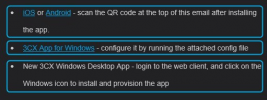
The welcome email actually explains how to install each with three different points:
1643105486550.png

it download and install the old version 16 app that does not work with IPv6.
The link and config file in the welcome email is indeed for the previous windows app (aka 3CX Phone for Windows), but, that app should also work fine with IPv6.

It might be worth running the 3CX Windows App (3CX Phone for Windows) again and running a packet capture to determine what it sees after doing a dns query and where it sends traffic to after that.
 
The welcome email actually explains how to install each with three different points:
View attachment 27363


The link and config file in the welcome email is indeed for the previous windows app (aka 3CX Phone for Windows), but, that app should also work fine with IPv6.

It might be worth running the 3CX Windows App (3CX Phone for Windows) again and running a packet capture to determine what it sees after doing a dns query and where it sends traffic to after that.
Hello !

Just an update.
I switched our company's production server to IPv6.
The Android and IOS apps, work well in IPv6.
All the clients that were in V18 too.
But as for the tests, the V16 clients are still using IPv4.

But well, the V16 client are coming to the end of their life, so I don't think it's worth wasting too much time to do more analysis.

Thanks for your help!
 
  • Like
Reactions: ChrisC_3CX
But well, the V16 client are coming to the end of their life, so I don't think it's worth wasting too much time to do more analysis.
Yeah you're probably right on that!

Using the latest v18 Desktop app is probably the best way to go anyway so do let us know if anything else comes up!
 
Status
Not open for further replies.

Forum statistics

Threads
112,025
Messages
590,367
Members
164,977
Latest member
jasimbutt82