Under Review How to sync specific user group from Azure AD

CodeTwo

Customer
Joined
Jun 27, 2017
Messages
42
Reaction score
3
Hi,

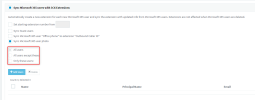
Is there a way to sync specific group of users from Azure AD to 3CX? I do not want to sync all users, just users from specific departments.

Why these buttons are greyout?
1675170998335.png
 
While waiting for 3CX to implement a group-based sync (hopefully!), is it possible to use the 3CX API to do this? We can whip up a Powershell script that pulls the list of users from a certain group in AD or AAD and add them into the list of users synced into 3CX.
 
  • Like
Reactions: yesss-de
+1

This would be really nice so that we don't have to worry about emails that we don't want being created and then need to remember to go into 3CX and remove the sync.
 
+1 too !! Sync only with existing users is a desired option that could solve lot of cases !
 
Hello are there updates from V20? Is there a tool we can use to in the meantime to sync specific groups?
 
Hello are there updates from V20? Can we use a tool to sync specific groups in the meantime?
 
With our 3CX Active Directory Sync tool you can select individual organizational units to synchronize. That is helpful if, for example, you have a large directory that spans multiple geographic locations. You may not want to add European users to a USA 3CX instance. We also support the automatic creation of departments (optional), and assigning users to the appropriate departments based on properties in AD. When we create new users you can specify a template user to provide default user settings that are not specified in AD. We also support deleting/disabling users who are no longer found in AD, while allowing you to exclude specific users (dummy extensions) from the delete feature so we do not disable "special purpose" user extensions used for things like routing calls by presence, etc.

Today, we only support traditional Active Directory, but I see posts like this one so frequently that I'm thinking it may be time to expand our tool to support other flavors of Active Directory (or other LDAP directories for that matter). If you have interest in helping fund some of the work (I will provide some funding too), let me know.
 
  • Like
Reactions: victech
Same here, I don't think there will be any enterprise organisation where the current user sync is helpful. We definately need to filter by Entra Group(s).

Another big problem I see is that 3CX creates new extension numbers anywhere a free extension is. However, in enterprise environments the staff gets extensions by a plan. Easiest solution would be to use the extension number found in the phone ext field from the user in Entra directory.

@VoIPTools: your tool looks nice and having the sync only from local Active Directory would be fine for me. However, that doesn't fix the issue to have these users able to login by SSO thru Entra. A user match will be done by matching E-Mail-adresses, so getting the user synced/created by your tool from local AD helps to create new extension including correct extension number, departement etc. However, I still would have to manually select each user to activate it for M365 integration to make them use Entra SSO (and Teams status sync as well). Do you have an idea for that?
 
However, I still would have to manually select each user to activate it for M365 integration to make them use Entra SSO (and Teams status sync as well).
I imagine a scrip to call the API and toggle that for a new user wouldn't be super complicated to schedule/run.
 
All things are possible with funding. I know I should allocate some resources to do more with syncing from other sources. It's just a matter of priorities. Too much work and not enough time.
 
  • Like
Reactions: Evolute IT
+1
and/or add/remove user in this sync list by API
 
Any news about this?
 
I would like this as well. Does this exist anywhere in the feature request forums?
 
+1 for syncing from selection of entra groups
 
Any updates on this?
 

Forum statistics

Threads
112,025
Messages
590,369
Members
164,979
Latest member
FringeIT-Eric