Thanks for the suggestion. I guess I should have been a bit more specific :-(Hi
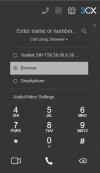
Regarding your question, try changing the to use browser from the drop-down in the dialer, then check the audio options again.
View attachment 35175
Also, check that you have given the browser access to your mic and speakers or whichever audio device you are using.
https://www.3cx.com/user-manual/web-client/
Try closing the desktop app and using only the webclient in browser mode, to start with. Then see this post: https://www.3cx.com/community/threads/microphone-error.112719/Thanks for the suggestion. I guess I should have been a bit more specific :-(
I have both the browser set up and desktop app installed. The desktop app allows me to enter a phone number (and I can hear the DTMF tones so I assume it can use my headset) but, when I click "call", it goes away for a few seconds and then drops the call. No error, nothing. No idea why.
In the browser, it tells me "Your microphone is blocked so you cannot answer calls. Unblock and try again" without a single hint as to how to do that. When I go into settings, it has a stripe across the center of the browser saying "Allow microphone and camera access." but all of the choices below (mic, etc) are greyed out and it, again, gives me no hints as to how to unblock them. :-(
Founded in 2005, when VoIP was an emerging technology, 3CX has gone on to establish itself as a global leader in business communications.