How To upgrade to 3CX V18

Status
Not open for further replies.

Kwang Mien

Silver Partner
Advanced Certified
Joined
May 14, 2020
Messages
255
Reaction score
17
Hi,

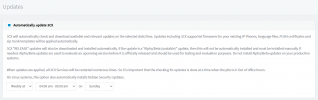
I would like to upgrade our 3CX Version 16.0.9 to version 18. However, after selecting "Updates", the upgrade button does not exist. Please refer below.

Kindly advise how can I upgrade to Version 18 ?

Thanks.

1633926765134.png

Thanks.

Regards,
Kwang Mien
 
I noticed on a few of my instances where I definitely had the option before to upgrade to v18, it has now also disappeared. Seems it was removed?
 
I noticed on a few of my instances where I definitely had the option before to upgrade to v18, it has now also disappeared. Seems it was removed?
Same here, was going to work on an upgrade tonight and noticed it was gone. Does this have something to do with the beta version that was available?
 
We have the same issue here on multiple on-premise PBXs.
Was able to bring the 3CX PBX up-to-date to version 16.0.8.9 (and also installed letsencrypt hotfix).
Update to v18 is not offered (don't know if it was offered before we installed the letsencrypt hotfix)
 
Hello!

Late Friday and over the weekend there were some updates to the Debian 10 repositories.
While we are checking that those updates are still compatible with the Deb9 to Deb10 upgrade process, we have temporarily disabled the OS upgrade button.

Once we have verified that all is OK and, if necessary, made any changes to the OS upgrade script, we shall reinstate the option.

While this may have upset your plans slightly, please understand that we did so to protect you and ensure the OS upgrade continues to go smoothly for all.
 
@NickD_3CX I attempted to upgrade two Azure V16 instances to V18 on Saturday (10/9), both of which failed due to the following error:

[33m====== [17:08:43] Upgrade: Grub preparation - Installing debconf-utils to handle necessary grub input[39m
> Execute apt command simulation on "install debconf-utils"
Reading package lists...
Building dependency tree...
Reading state information...
Some packages could not be installed. This may mean that you have
requested an impossible situation or if you are using the unstable
distribution that some required packages have not yet been created
or been moved out of Incoming.
The following information may help to resolve the situation:

The following packages have unmet dependencies:
debconf-utils : Depends: debconf (= 1.5.71+deb10u1) but 1.5.61 is to be installed
E: Unable to correct problems, you have held broken packages.
> Simulation failed (install debconf-utils)
/tmp/update.sh: line 97: /usr/sbin/3CXStartServices: No such file or directory
::FAIL::

In both cases, the upgrade appears to fail after 3CX is removed and when attempting to upgrade Debian 9 to 10.

Both were plain vanilla V16 installs the were created using the "3CX Phone System" app in the Azure Marketplace.
 
Hello!

Late Friday and over the weekend there were some updates to the Debian 10 repositories.
While we are checking that those updates are still compatible with the Deb9 to Deb10 upgrade process, we have temporarily disabled the OS upgrade button.

Once we have verified that all is OK and, if necessary, made any changes to the OS upgrade script, we shall reinstate the option.

While this may have upset your plans slightly, please understand that we did so to protect you and ensure the OS upgrade continues to go smoothly for all.

Hi Nick

Appreciated the stalled rollout, however we're in a bit of a pickle in that bridge mode between v16 and v18 doesn't work and we're caught mid-stream with some clients.

We also have clients wishing to move to v18 due to Teams integration, they've been sold on the cool aid, we've upgraded their licenses to Enterprise and now having to tell them it's waiting game.

Can we please have some sort of time line?

Appreciate it won't be an exact or committed timeline but "something" would be better than nothing.

Kind Regards

Scot
 
  • Like
Reactions: Evolute IT
Hi Nick

Appreciated the stalled rollout, however we're in a bit of a pickle in that bridge mode between v16 and v18 doesn't work and we're caught mid-stream with some clients.

We also have clients wishing to move to v18 due to Teams integration, they've been sold on the cool aid, we've upgraded their licenses to Enterprise and now having to tell them it's waiting game.

Can we please have some sort of time line?

Appreciate it won't be an exact or committed timeline but "something" would be better than nothing.

Kind Regards

Scot
Hi Scot,

We have all hands on deck with this and are currently working on delivering a solution to re-instate the OS Upgrade option.
We are also ensuring that this works on all hosting platforms and ISO.

If I had to warrant an estimate, I would say within the next few days after our testing is complete.
 
A few hours ago we reinstated the OS upgrade button. We have made the necessary changes and checked all supported hosting platforms and 3CX ISOs and there should not be any other problems from now on.
 
A few hours ago we reinstated the OS upgrade button. We have made the necessary changes and checked all supported hosting platforms and 3CX ISOs and there should not be any other problems from now on.

Excellent, thanks Nick/3CX Team....
 
  • Like
Reactions: N_G and NikosT_3CX
Hello,
I noticed that the iso didn't change, so my question is whether problems with a clean install should be resolved as well.
 
Hello,
I noticed that the iso didn't change, so my question is whether problems with a clean install should be resolved as well.
You are right, the ISO though during the installation process does download some scripts and references from online (that's why internet access is required), so those are what have been adjusted.

As you correctly said though, don't try and just power on a machine that failed a few days ago, try to redeploy the ISO as that is the safer way to go.
 
Status
Not open for further replies.

Forum statistics

Threads
111,974
Messages
590,081
Members
164,899
Latest member
mazet