HTech firmware - upgrade fail

Status
Not open for further replies.

SimoneNesi

SOHO User
Joined
May 17, 2019
Messages
35
Reaction score
4
I dont use HTek phones with my 3CX deployments but I think most likely that either:

  • The firmware file is either the wrong version for the model you have.
  • Not a 3CX supported version.
  • Or you are trying to jump too many versions and need to apply an interim version.

This link to version types should help further. https://www.3cx.com/support/phone-firmwares/
 
Hello SimoneNesi,

Can you confirm the: DSP version.
You can find this at "Home" (i.e. DSP--9.0.3(Patch 1.0.16M))

If M patch is given you need the E firmware which is also given at the website given by eddv123.
I have had this problem before with our HTEK924 phones
 
Hello PimvanD, eddv123
thanks for reply.
I followed your suggestion and upload the firmware for the Htek UC912E on my UC912G and it works very well.
thanks
Simone
 
Glad it solved your problem!
 
Hi Simone,

Did you try upgrading from the management console instead of manually upgrading from the phone UI ?
 
No, I didn't. I don't know how perform the FW update from management console.
 
Ok that should be fairly simple, first you go to the updates section, to see if there any updates for firmware or templates.

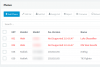
Once those are done, you simply click the Phones section and it will show you any phones with the wrong firmware in red and say "Not supported". Here is a small example:

14004

If I click extension 001 and 002 and then click the "+Firmware" button on top, it allows me to update the firmware automatically!
 
Just keep in mind a general detail that is important when upgrading firmware:

If the firmware is "too old", and you try to install a new one which is "too new", many phone manufacturers will prevent you from doing this and the update will fail (both for automatic updates and manual updates - doesn't matter which method you use). They will sometimes do this to prevent the phone from crashing during the upgrade procedure (resulting in destroying your phone due to the crash).

The correct solution in such cases, is to visit the manufacturer's site and download all the previous versions that you missed, and upgrade step by step to the newer version. Usually they will give you instructions and say "for version 2.0.2 or less, please upgrade first to 2.0.3". Then you will be allowed to go to 2.0.4 and so on and so on.

In those cases its best to factory reset the phone too, and when you finish everything, reprovision it now. This is to avoid leaving behind any old settings or options that may be stuck in the phone.
 
  • Like
Reactions: Evolute IT
Hi JohnS, PimvanD,
I tried the firmware update from 3CX of the Utek 921G form ..45 to...47 version but it filed without any message.
So I downloaded the firmware of the Htek UC912E from 3CX firmware area and manually update the phone and it successfully updated.
thanks so much for your suggestion!
Simone
 
To be honest it should work.

Though I had this issues myself a few days back and went in searching for the problem.
Eventually I found an issue on the provisiong server. My provisioning server in the phone itself was directed to our 3CX firmware folder on the server where our 3CX is running from.

/var/lib/3cxpbx/Instance1/Data/Http/Interface/provisioning/xxxxxxxxxxxxx/firmware/htek

The firmware which was downloaded was the wrong one as in the normal 924 firmware instead of the M version for the 924.
It seems that 3CX is downloading the wrong file for the DSP 9.0.3. (Patch 1.0.16M)
If M patch is given you need the E firmware. For some reason I think 3CX is not recognizing this.

Although im not entirely sure. I have put the right firmware file in the folder and for some reason it provisioned right away when pushing the provision button in 3CX
 
Last edited by a moderator:
Status
Not open for further replies.

Forum statistics

Threads
111,935
Messages
589,823
Members
164,817
Latest member
Innovative Advisory