Hubspot Client end Integration with 3cx for Call Popup

Status
Not open for further replies.

Rashid Raza

New User
Joined
Aug 20, 2020
Messages
134
Reaction score
23
Hi,

How can I integrate Hubspot with 3cx on client-side?
Server end configuration is successfully done.
 
Client-side has nothing to do. All is server-side.

Just use the Webclient to take advantage of it. The Windows Client does not support the server-side integration yet.
 
  • Like
Reactions: edossantos
Hi Frederick,

Server end integration just creates contact with "New 3cx Contact".

And all the new hubspot contacts shown In 3cx contacts shown to all.


But we want hubspot to work like fresdesk works. i.e client side integration,contact popup on call ,create ticket etc.
 
The integration with Freshdesk is server side as well, and works in the same way the integration with Hubspot does.

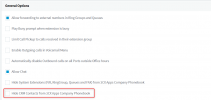
When you receive an inbound call, the contact details are queried against the CRM and added to the 3CX global phonebook. You have a setting to hide CRM contacts in Settings > General:
1610379472906.png

If the integration is always creating new contacts, then the lookup is probably not working properly. You should test the integration from the 3CX Console > Settings > CRM Integration > Test button, in order to understand why. Use exactly the same phone number format that you receive from your SIP Trunk.
 
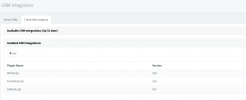
But we are using Freshdesk on client ends, and configured integration on specific users 3cx windows client.
Freshdesk.PNG
 
  • Like
Reactions: Evolute IT
3CX is no longer creating client-side integrations, and have depreciated those integrations that they created prior to releasing the server-side integration.

Frankly, I'm not sure how long 3CX will continue to include client-side plugin technology in 3CX Phone for Windows. However, building a custom plugin for 3CX Phone for Windows and HubSpot is an option. Alternatively, if you are concerned about the longevity of this feature, you could build your own application that subscribes to call events (using the 3CX Call Control API), and have that application perform the popup. This approach would work with any client (web, windows or physical phone).

Client-side applications always have one major drawback -- installing and maintaining the client application on every PC. Further, you have to consider that 3CX and HubSpot will make breaking changes from time-to-time so this is not a write-once-and -done situation. You will have to make code changes occasionally.

We currently use HubSpot internally here at VoIPTools and have written a custom integration. However, depending on the features of the newly announced 3CX help desk feature, we might start using that rather than HubSpot if it meets our needs.
 
  • Like
Reactions: Evolute IT
This integration was useful in the case of specific users from 3cx Windows client.

But anyway thanks for your prompt support
 
Hi @VoIPTools .

Thanks for your response and yes we are waiting for 3cx Helpdesk.
 
  • Like
Reactions: NickD_3CX
Further, when we use WebClient and click on the contact button with the call it does not open HubSpot for ticket creation or user details.
 
Further, when we use WebClient and click on the contact button with the call it does not open HubSpot for ticket creation or user details.
Check if the browser is blocking popups from the Web Client. The popup will open the contact record. Call Journaling happens when the call ends.
 
The popup is not blocking from the browser.

Further, after HubSpot's server end integration now all new incoming call numbers are creating as contact and it shows New 3cx Contact**** to all Users on 3cx.

It must be created in HubSpot not in 3cx as freshdesk.
 
It's probably due to the new updated template for HubSpot. You need to make sure your phone numbers are in the same format from the SIP Trunk to the CRM. So, if you use E164 in the CRM (+15551230000) then 3CX needs to be configured to send those digits to the CRM Lookup. That is configured in the matching policy.
 
  • Like
Reactions: edossantos
Hi Frederick,

Thanks for your prompt response.

The phone numbers are in the same format as SIP Trunks and before integration, there is no contact in 3cx.

Is there any option to allow contact creation in Hubspot but not in 3cx . And when the call receives 3cx display contact details saved in HubSpot?
 
Is there any option to allow contact creation in Hubspot but not in 3cx . And when the call receives 3cx display contact details saved in HubSpot?
The contact is already created in the CRM. But 3CX saves the infos locally. Then, on the next calls, the infos for that customer will be updated with the newer data from the CRM.
 
  • Like
Reactions: edossantos
Status
Not open for further replies.

Members Online Now

No members online now.

Forum statistics

Threads
111,831
Messages
589,277
Members
164,660
Latest member
RJenkinsROCK