I cannot connect to 3cx if I leave my wireless network

Status
Not open for further replies.

thanosgen

SOHO User
Joined
May 13, 2022
Messages
27
Reaction score
0
I have 3cx V18 and Pro version in Windows pc installed. In August my phone suddenly stop working when I leave my wifi network.
In July it working fine.

Does anyone know how I will fix it??
 
Perform a firewall test first then resolve an issues this brings up.

Are you on the latest build of 18?
 
Does the windows pc have a fixed ip? Portforwarding correct? Firewallcheck ok?
 
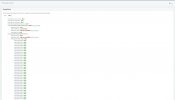
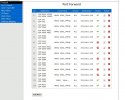
I already did them but it is not working. Yes this is the version - 18.0 (Build 31). This error in ports always was red. From the begging. In screenshot 1 you will see the ports test and in screenshot 2 the modem open ports.
 

Attachments

  • screenshot 1.jpg
    screenshot 1.jpg
    153.3 KB · Views: 7
  • screenshot 2.jpg
    screenshot 2.jpg
    142.9 KB · Views: 7
https://www.3cx.com/docs/manual/firewall-router-configuration/

You've got too many ports open. see above link.

I can see that youre blocking 5090 which is the tunnelling port which the app uses.

Also, is your home internet IP dynamix or fixed? If its a home network then 9/10 its dynamic.

Under the network settings of your 3CX I would suggest turning on dynamic so the IP address can change when the ISP changes your WAN address.

When you ping your FQDN on the wifi I assume it returns 192.168.1.230.

from within your network go to https://www.whatsmyip.org/

disconnect off your network and ping your 3CX FQDN - does it return the same IP from previous step?
 
There is your problem... You need to fix your firewall portforwarding. @Alphabetic posted the manual
 
https://www.3cx.com/docs/manual/firewall-router-configuration/

You've got too many ports open. see above link.

I can see that youre blocking 5090 which is the tunnelling port which the app uses.

Also, is your home internet IP dynamix or fixed? If its a home network then 9/10 its dynamic.

Under the network settings of your 3CX I would suggest turning on dynamic so the IP address can change when the ISP changes your WAN address.

When you ping your FQDN on the wifi I assume it returns 192.168.1.230.

from within your network go to https://www.whatsmyip.org/

disconnect off your network and ping your 3CX FQDN - does it return the same IP from previous step?
1. I setup only 4060 443 etc ports and not 5060 5090(I use 4090) etc
2. It is static ip local on my windows 10 pc which is on all the time (24/7). And I need it be always in this so I can find it with 3cx ip and my client CRM program.
3. 192.168.1.230 is my static ip
4. I cannot understand how FQDN is working. I must do the tutorial with the windows registry settings? (But i think this is for 3CX V20 version )
 
You've either not read or decided to ignore the latter points I asked you to check, go back to my post and go through the troubleshooting again.
 
Status
Not open for further replies.

Latest Posts

Forum statistics

Threads
111,953
Messages
589,915
Members
164,850
Latest member
masvty