I can't enter my own domain in 3cx installation

Status
Not open for further replies.

Aysel

New User
Joined
Nov 21, 2021
Messages
2
Reaction score
0
Hello guys. Please help me. When I try to install 3cx v18, it asks for FQDN and it only allows me to choose the domains which 3cx offers to me. But I want to use our company domain in FQDN. How can I do this? Even when I choose Custom domain option, I can't enter my company domain. By the way this is an enterprise version for a year.
 
Hello guys. Please help me. When I try to install 3cx v18, it asks for FQDN and it only allows me to choose the domains which 3cx offers to me. But I want to use our company domain in FQDN. How can I do this? Even when I choose Custom domain option, I can't enter my company domain. By the way this is an enterprise version for a year.
If you're using the free upgrade, the custom FQDN feature is not included.

Also, you can't use PBXExpress (deployment wizard) for that. You need to use the ISO or the marketplace images.
 
If you're using the free upgrade, the custom FQDN feature is not included.

Also, you can't use PBXExpress (deployment wizard) for that. You need to use the ISO or the marketplace images.
Thank you for answer! You mean it is impossible to use my own domain in free upgrade? Actually after free upgrade I install .exe for Windows, it is same. I can't choose my own domain. What kind of iso do you mean? Because there was not .iso version of this.
 
Thank you for answer! You mean it is impossible to use my own domain in free upgrade? Actually after free upgrade I install .exe for Windows, it is same. I can't choose my own domain. What kind of iso do you mean? Because there was not .iso version of this.
So, 3CX comes in 4 deployment ways:
- the 3CX Debian ISO, downloadable from your customer portal.
- the Windows installer, for Windows 2016+/10+ (Also downloadable from the customer portal)
- the Marketplace images for AWS, Azure and Google
- the Deployment Wizard (previously PBXExpress) for DigitalOcean and quick deployments to Cloud providers.

If you use the free upgrade, the license key will be marked as such, therefore you cannot use the custom FQDN and a couple other features, whatever the method you used for installation.

To use your own FQDN, you'll need to buy a true Pro/Enterprise license. (We can help you with that if needed.)
 
Hi @Aysel ,

I believe you should be able to use your own domain/FQDN with your key by the time it has been set to be an Enterprise for the first year.

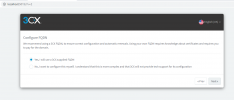
During the on-premise installation (e.g. on Windows) you should see this at some point:
1637570700335.png

If you don't , it is probably because there is already an FQDN bound to your License Key.

What you can do, log into your Customer Portal and release the FQDN from your license key. Then, try and new install on your Windows Server that you tried before and you should get this option.
 
  • Like
Reactions: Evolute IT
Status
Not open for further replies.

Forum statistics

Threads
112,149
Messages
590,965
Members
165,170
Latest member
SupportRock