I can't log in with my user

Status
Not open for further replies.

ENTerprise_NT

New User
Intermediate Cert.
Joined
Nov 16, 2021
Messages
34
Reaction score
1
I have not been able to access my user for a few days. I have already enabled the web client but when I log in it does not log in. It gives no message. But when I try to log in from the app on my smartphone (scanning the qr), it gives me the message: "User is not allowed to log in", why? What else do I need to check to re-enable it. Until a few days ago it worked. I also did its regeneration but the problem continues.
 
Hi @ENTerprise_NT,

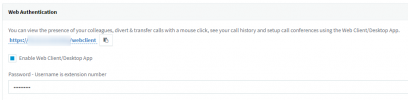
When you're attempting to login, are you sure that you're navigating to the correct page? In the Management Console, Navigate to Users then click the link in the Web Authentication area. Ensure also that the "Enable Web Client/Desktop App" box is checked.
1639581317954.png

Can you clarify what happens when you click log in? "I have already enabled the web client but when I log in it does not log in. It gives no message."
 
Hi @ENTerprise_NT,

When you're attempting to login, are you sure that you're navigating to the correct page? In the Management Console, Navigate to Users then click the link in the Web Authentication area. Ensure also that the "Enable Web Client/Desktop App" box is checked.
View attachment 26613

Can you clarify what happens when you click log in? "I have already enabled the web client but when I log in it does not log in. It gives no message."
I have already done this
 
Hi @ENTerprise_NT,

When you're attempting to login, are you sure that you're navigating to the correct page? In the Management Console, Navigate to Users then click the link in the Web Authentication area. Ensure also that the "Enable Web Client/Desktop App" box is checked.
View attachment 26613

Can you clarify what happens when you click log in? "I have already enabled the web client but when I log in it does not log in. It gives no message."
He goes back to the login screen and makes me re-enter the credentials.
 
Hi @ENTerprise_NT,

Does this happen for multiple extensions or only yours?

If you create a fresh new extension and log in without changing anything except the password, does it work?

If you try to log in using a different browser, what happens?
 
All the others work. They also work from the same browser and the same smartphone. I only have problems with my extension.
 
I would not want to delete my extension because it is linked to all other extensions. My mailbox has been set up as a shared mailbox on all extensions and if I delete my extension I have to reconfigure all other extensions.
 
To clarify, you're inputting your 3CX extension number and password, and NOT a single sign on method such as Google?
 
Exactly. If I can I attach a video.
 
I see I can't attach a video.
 
Hi @ENTerprise_NT,

PM me a link of the video. Click my icon and select "Start Conversation"
 
Can I zip it and attach it?
 

Attachments

Hi @ENTerprise_NT,

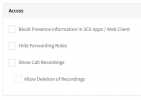
Can you check your extension Phone Provisioning tab, select 3CX App and then scroll to the bottom, under Access, does your extension have the option 'Block Presence information in 3CX Apps / Web Client' enabled? If so, disable it.

1639641163697.png
 
Ok. I thought that that way I could use my extension without showing my presence to the rest of the users. However I have disabled the option and now it works. Thanks so much.
 
Thanks for letting me know @ENTerprise_NT, glad to hear it's working now.

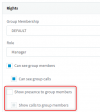
You can change your presence information for your specific extension, unchecking the option: "Show presence to group members".

1639646272090.png
 
Status
Not open for further replies.

Forum statistics

Threads
112,349
Messages
592,027
Members
165,514
Latest member
megalmazan