I can't make to work console managment restriction in V16

Status
Not open for further replies.

3cx-pbx-locnet

Free User
Joined
Jun 17, 2019
Messages
4
Reaction score
0
Hello to all.

I've installed V16 on debian 9.9 from scratch and got trial 40-day license a few days ago and all seems good so far except that I can't restrict access to web management console login form.
My new 3cx server uses 443(HTTPs) port of Web Server and resides behind NAT-router, port 443 properly forwarded by that router.

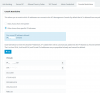
At present time 3CX security config looks like this:
SSL Transport and Ciphers = YES
11023

But the restrictions seems do not work because I can gain access to Management Console Login Form from anywhere and not only from IPs from list above.

Could you please point me out to where I missed something in configuration or made mistake(s)?

Thanks.
 
Well guys, did nobody face that issue? Am I the only one so lucky?
 
If your routers NAT is changing the source address to that of the router, this would happen.

I'd check to see what IP 3CX thinks you are connecting from when you get in "from anywhere".
 
  • Like
Reactions: JohnS_3CX
Yes as @treefiddy pointed out, if the router changes the source address then the PBX sees the traffic coming not from outside, but from within the trusted subnets.

If this is the case then your PBX is responding correctly to allow traffic.
 
Hello and thanks you guys for your answers.

Yes, I've read about such NAT specifics in somewhere on this Forum.
But here what I've had at that time and the same rigth now when I try to connect to my 3cx-server(int. IP 192.168.99.24) at port 443 through my NAT-router from 178.xx.xx.170:

root@3cx-pbx:~# netstat -tpna|grep 443
tcp 0 0 0.0.0.0:443 0.0.0.0:* LISTEN 452/nginx: master p
tcp 0 0 192.168.99.24:443 178.xx.xx.170:55500 ESTABLISHED 453/nginx: worker p
tcp 0 0 192.168.99.24:443 178.xx.xx.170:55498 ESTABLISHED 453/nginx: worker p
tcp 0 0 192.168.99.24:443 178.xx.xx.170:55495 ESTABLISHED 453/nginx: worker p
tcp 0 0 192.168.99.24:443 178.xx.xx.170:55497 ESTABLISHED 453/nginx: worker p
tcp6 0 0 :::443 :::* LISTEN 452/nginx: master p

At first glance all seems to be correct and I see that connects come from from public IP and not from internal IP of my NAT-router.


The external IP of NAT-router is 109.xx.xx.xx.
And as you can see in config of 3cx-server the connects allow only from this external networks 109.xx.xx.xx/yy and 94.xx.xx.xx/29.

And I specially tuned on logs in nginx config and watch this in access.log when I connect from Internet:
178.xx.xx.170 - - [03/Jul/2019:21:07:14 +0300] "GET / HTTP/1.1" 200 425 "-" "Mozilla/5.0 (Windows NT 6.1; WOW64; Trident/7.0; rv:11.0) like Gecko"
178.xx.xx.170 - - [03/Jul/2019:21:07:15 +0300] "GET /api/CurrentUser HTTP/1.1" 403 0 "https://my_3cx_pbx.tld/" "Mozilla/5.0 (Windows NT 6.1; WOW64; Trident/7.0; rv:11.0
178.xx.xx.170 - - [03/Jul/2019:21:07:15 +0300] "GET /l10n/en.json HTTP/1.1" 200 237284 "https://my_3cx_pbx.tld/" "Mozilla/5.0 (Windows NT 6.1; WOW64; Trident/7.0; rv:11

Is there anything else that I missed in configs?

Thanks.
 
After all it solved but not quite like that as I supposed. Console restictions do not prevent access but show login page and prevent login with any credentials. It is not very clearly described in the documentation.

That what was got from support:

"Actually when trying to access the management console from a disallowed public IP (i.e one not listed in the Console Restrictions whitelist), then you will still be able to see the login form but always get a message "Login access denied. Too many incorrect login attempts. Try later or contact the Administrator.", whether the credentials are correct or not.

That's how the feature was designed."
 
Status
Not open for further replies.

Latest Posts

Forum statistics

Threads
111,932
Messages
589,805
Members
164,804
Latest member
fcentral