Solved i20s Door remote password

Status
Not open for further replies.

videojedi

Customer
Joined
Feb 16, 2022
Messages
10
Reaction score
3
I have succesfully provisioned an i20s door phone. Everything works, except the remote door open code, which should be the voicemail password for the extension?

The EGS logs just say Remote Code Failed and the i20s makes its usual unhappy noise when we enter the voicemail password.

I have tried re-provisioning from phones page in 3cx, but nothing helps


Any thoughts please?
 
Are you running the latest firmware and correct provisioning template?

you could always log in to the unit and check what code it has.
 
I'm running firmware v2.8.2.1720 and the latest provisioning template.

When Iog into the fanvil, the Remote password field is not there.
 
The field is missing completely or blank?

Can you send screenshot of the ESG page
 
Are you entering the PIN on the i20S keypad? (this is not what we provision)

Or are you sending the password over the phone, once you answered an incoming call from the i20S? (this is the only thing we provision)

Correction: what we provision is the keypad password field aka <Local_Password>
 
Last edited:
I'm answering the call on another extension (sending over the phone) and trying to let the visitor in using the voicemail password.
 
I had to install 2.8.2.7020 directly, as trying to upgrade via the phones page in 3cx didnt work
 
I think there might be a possibility of misconfiguration then, it would be best to factory reset it to clear everything, and then provision it again from scratch.
 
from what i'm seeing in the manual youre supposed to have a "remote password" field and not what you have. Does it say youre on FW 7020?
 
Tried a factory reset and re-provision. Same deal.

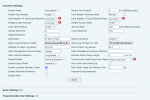
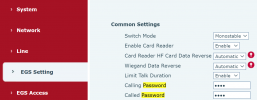
However can just manually set the 'Calling' and 'Called' password fields in the EGS settings.

Thanks for help
 
If this is the case 3CX need to review the template for the i20s.
 
Hi all,

I have reviewed the template, and you are absolutely correct. What I originally said above was incorrect - The PIN that is provisioned on this model is only for they keypad, and always was this way.

The guide will be corrected to clarify this so that we do not cause any confusion in the future.

1645176626987.png

As for the Remote Open password, it must be provisioned manually by you via the fields mentioned earlier:
1645176819032.png
 
Status
Not open for further replies.

Members Online Now

Forum statistics

Threads
111,835
Messages
589,288
Members
164,665
Latest member
dominik.pepel