- Joined
- Nov 8, 2008
- Messages
- 79
- Reaction score
- 1
Most frequently I notice that some inbound calls lock the extension (remote) making it unable to receive more incoming calls.
In reality the extension is free without any call answering.
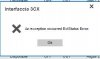
Checking in the extension status panel, there is evidence of the call but, tryng to force disconnection of the call, i receive the following message : 3CX Interface: An Exception Occured ExtStatus Error (see the attachment).
Shutting down and restarting the ip phone don't solve issue.
The only way to solve the issue is restarting all 3cx services.
Investigating the issue, i noticed that is more frequently in branch office where adsl connection is poor and sometimes there are some degraded performance or service down.
Could you give me some workaround alternative to restart the 3cx ?
Thank you
In reality the extension is free without any call answering.
Checking in the extension status panel, there is evidence of the call but, tryng to force disconnection of the call, i receive the following message : 3CX Interface: An Exception Occured ExtStatus Error (see the attachment).
Shutting down and restarting the ip phone don't solve issue.
The only way to solve the issue is restarting all 3cx services.
Investigating the issue, i noticed that is more frequently in branch office where adsl connection is poor and sometimes there are some degraded performance or service down.
Could you give me some workaround alternative to restart the 3cx ?
Thank you