Inbound Caller ID on Mobile Numbers in Extensions

Status
Not open for further replies.

ws-kbrown

Free User
Joined
May 21, 2021
Messages
5
Reaction score
1
We have recently implemented a 3CX phone system and have found that Caller ID doesn't appear to be using Extension Mobile Numbers as a source for identifying calls.

If we put the number in as a contact, it recognises it right away but this duplicates the number in the system for anyone transferring or making calls.

Is there a way we can get it to use the Mobile Numbers under each person's extensions to identify the call as well as the contacts lists?
 
Hi @ws-kbrown,

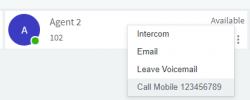
Internal extension to extension calls cannot have their mobile number displayed. Using the Web Client, and having a mobile number entered in to the extension's mobile number field, you can right click on the person and select call mobile.

1621582853343.png
 
  • Sad
Reactions: Anaphylaxis
Hey Vasilis,
I've just experience this same issue -- clearly there is some confusion on your part.
OP is saying that his extensions in the system have the "Mobile number" filled out. When the user calls in, the number is displayed as just the number instead of resolving back to the user's name. If you add them as a contact, it will work, however this duplicates the information -- he's asking why is this not resolving from the mobile #, and I would love to know the same.
 
  • Like
Reactions: ws-kbrown
@Anaphylaxis bang on there. Yes that is the issue.
No problem all I had to do was read your issue and I understood it.
I have exported all the extensions into a CSV, renamed "MobilePhone" to "Mobile" (why isn't this consistent???) and imported them into Contacts to fix this temporarily. Hoping for a reply from 3CX soon so we don't have to duplicate this information across the PBX.
 
We could do that and have tested it. But don't want to have to go through and remove them all if there is a fix. There's almost 200 staff so thats a fair few to have to remove, and it shows up as a duplicate number when you go to call out/transfer to them.
 
  • Like
Reactions: Anaphylaxis
Currently, only the contacts list is used to match incoming calls. Extension information is available to 3CX Clients via presence and therefore is separate from contact information. Currently, as Anaphylaxis said, probably the best way to get around this would be to export the extensions, modify the .csv file to have the same format as contacts and then import it as contacts.

You might also want to consider upvoting the following post in our Ideas section which, if I am not mistaken, is referring to the functionality you are describing: https://www.3cx.com/community/threads/contact-search-in-extensions-during-an-incoming-call.77808/
 
Status
Not open for further replies.