Inbound Caller ID

Sara Marlar

Gold Partner
Advanced Certified
Joined
Nov 7, 2024
Messages
9
Reaction score
4
Hello,

We have a self-hosted 3CX PBX with a Pro license. It uses an Inteliquent trunk on a generic IP based template. It also has a router phone as the SBC.

Inbound caller ID does not show. From what I've read, it may be because Inteliquent sends Caller ID on the P-Asserted-Identity/Remote-Party-ID headers, and not in the From header, and when the SBC is involved, the invites get rewritten with a limited amount of headers, and doesnt include the P-Asserted-Identity/Remote-Party-ID headers. So since caller ID isnt being sent on the from header, it gets dropped.

Is anyone smarter than me able to confirm/deny this or help me with what I should be looking for to solve this?

I believe the sip trunk level settings here are only affected outbound caller ID
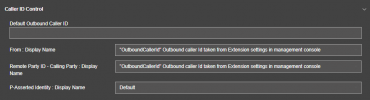
1763149146888.png
Thanks,
 
Okay, I should've started with a packet capture. The carrier is sending caller ID in on the From header, and the 3CX activity log shows caller ID on the invite, but it doesnt show up on the phones still.
 
I discovered via packet capture on a PBX with SIPTRUNK.com as the provider that does show CNAM, that they send it on the P-Asserted-Identity header, whereas Inteliquent sends it on the Remote-Party-ID and X-CNAM headers.

It seems like 3CX only cares to show CNAM from the PAI header and not from the RPID header.
 
Hello @Sara Marlar

As you said you are using the Generic SIP trunk template which is set up to read the Callers Name from the From:UserPart. The SIPTRUNK.com template is set up differently to match the providers functionality.

You need to configure the trunk to read the callers name from the From: DisplayName so you need to export the trunk, edit the xml and make the change to the inbound parameters. Then delete the existing trunk and import the template back into the PBX to add a new trunk with the updated template. You can do so from Advanced --> Templates --> Provider Templates --> Import Provider.
 
  • Like
Reactions: ElenaF_3CX
Thank you! I will do this
 
Hello @Sara Marlar

As you said you are using the Generic SIP trunk template which is set up to read the Callers Name from the From:UserPart. The SIPTRUNK.com template is set up differently to match the providers functionality.

You need to configure the trunk to read the callers name from the From: DisplayName so you need to export the trunk, edit the xml and make the change to the inbound parameters. Then delete the existing trunk and import the template back into the PBX to add a new trunk with the updated template. You can do so from Advanced --> Templates --> Provider Templates --> Import Provider.
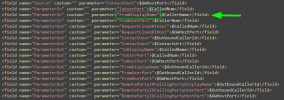
Does this appear to be the correct inbound parameter? I changed it from "FromUserPart" to "FromDisplayName"
1763571357790.png
 
Yes, that looks correct.
 
I had just encountered this and had to correct it on my side, instead with Telnyx. I have a new PBX I just spun up using the Generic VOIP template with no issues, but an existing one wouldn't re-write the outgoing DID.

The User Part was being written as the Trunk number, not the one passed by the extension in v20 even though the SIP header showed the display header.

I had to fix it by creating a new template and adding these to the gateway/provider outbound parameters.
<field name="ParameterOut" custom="" parameter="P-Asserted-Identity : Display Name">$CallerDispName</field>
<field name="ParameterOut" custom="" parameter="P-Asserted-Identity : User Part">$EnforcedOriginatorCallerId</field> (This is what ultimately fixed it)
<field name="ParameterOut" custom="" parameter="P-Asserted-Identity : Host Part">$GWHostPort</field>

I fumbled around and got it working, but had to re-assign all of our DID's manually as there is no tool. 3CX please bring this back to v20, it's such a pain with large sets of DID's.

Sara, also to mention, check with your SIP provider on what order they pass DID's. Telnyx respects in the parameters order: P-Preferred-Identity > P-Asserted-Identity > From. If your request has one of those, it might be overriding your from header.
 
but had to re-assign all of our DID's manually as there is no tool.
You can also import DID, their destination and their names.

To change the SIP trunk parameters you can also use the 3CX Config API without having to export, modify, import and completely reconfigure the SIP trunk every time. There are even forum users who have already published this as a guide. ;)

Edit:
I just saw it. You also asked the question about DID import elsewhere and it was answered there as well.
 
Last edited:
  • Like
Reactions: accentlogic

Latest Posts

Members Online Now

Forum statistics

Threads
111,831
Messages
589,276
Members
164,660
Latest member
RJenkinsROCK