Solved Inbound DID Routing Issue

Status
Not open for further replies.

Molan21

Joined
Oct 26, 2017
Messages
27
Reaction score
1
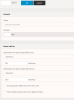
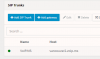
I have an inbound DID that I am trying to route directly to an extension. The extension is working fine and the DID is hitting the 3CX system. However it ignores the routing rule (by ignore I mean the rule isn't working for some reason)

The DID 1899 should route to ext 301 as defined in the inbound routing rules. instead when the DID 1899 is called ext 802 an IVR Greeting is answering the call.

Any ideas on what might cause this? I am on Version 15.5.0 currently

 

Attachments

  • DID Routing Issue.png
    DID Routing Issue.png
    18 KB · Views: 51
  • DID Routing Issue2.png
    DID Routing Issue2.png
    22.4 KB · Views: 51
I suspect the issue is that your carrier is presenting the number your customer dialed (DID) differently than what you have specified in 3CX. For example, with a PRI it is common for a carrier to only present the last 4 digits of a DID. I have also seen SIP trunks providers present the number in different formats. For example, on one call it may be presented to 3CX as 1234567890, and the next call as 11234567890, and the next +11234567890. If you define your inbound rule to match on 1234567890, 3CX will only match some of the calls, and in the case of a PRI none of the DIDs will match. The result is calls will be routed to the default route specified on the trunk.

The solution:

As a best practice, it's always desirable to define your DIDs using a wildcard. Using the example above, perhaps something like *4567890. This instructs 3CX to only match on the last seven digits, but you only need enough digits to ensure the match is unique. If, for example, your carrier is only presenting the last four digits, your DID would be defined as *7890.
 
I just tried changing the DID to *1899 but it still does the same thing. Is there a way that I can see the inbound number as the provider is presenting it? I have always used the full number with this provider and never ran into an issue before, but it would be nice to be able to verify how it is being presented to the 3CX system
 
3CX Activity log or Wireshark.
 
Hello @Molan21

Please note that Voip.MS is now a supported provider so if you haven't used the included template to setup the provider i would recommend using it. There is also a setup guide which will includes how you need to add your DIDs to the system.
https://www.3cx.com/docs/voip-ms-canadian-sip-trunk/
 
Voip.ms was defined as the provider in 3CX. interestingly this is the first site where I have had the opportunity to use specifically pick voip.ms. on my other installs I used Generic as Voip.ms wasn't added yet and those sites route correctly. Could there be a bug in the Voip.ms specific provider settings in the 3CX system?
 

Attachments

  • Voip.ms.png
    Voip.ms.png
    8.3 KB · Views: 15
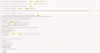
In the Activity Log even with Verbose logging enabled I cannot see anything that would indicate the phone number I am calling. It simply doesn't seem to show up in the log. I see plenty of instances of the phone number I am calling from in the log, but nothing showing the phone number I am calling too.
 

Attachments

  • 3cx log.png
    3cx log.png
    105.7 KB · Views: 18
Could there be a bug in the Voip.ms specific provider settings in the 3CX system

My carrier's template wasn't correct out of the box so it does happen (although my issues were to do with outbound CID).

A quick call to the carrier's tech support will probably save you a lot of mucking about as they should know exactly how the trunk parameters should be configured.

A quick check in 3CX shows that the trunk parameters for VOIP.ms and Generic are quite different so if they have worked with the Generic template in the past it might be worth trying the Generic parameters to see if it fixes your issue.
 
I will be in late tomorrow night. I will try comparing my carrier template settings with a Generic site then and see if it resolves the issue
 
The issue you are having is because Voip.ms does not send the called number in the Invite. This is happening because you skipped a step on the guide and the device type is wrong in the Voip.ms portal. It should be set to IP PBX server as per screenshot.
2018-10-12_11h09_56.png
 
YiannishH

You where correct. I was so caught up looking at 3CX I didn't go back to my provider to double check my settings on that end. I did miss that check box. Selecting that immediately fixed the issue.

Thank you
 
You where correct. I was so caught up looking at 3CX I didn't go back to my provider to double check my settings on that end. I did miss that check box. Selecting that immediately fixed the issue.

Thank you
Glad to see the issue has been resolved and thank you for updating the thread with your solution.
 
Status
Not open for further replies.

Forum statistics

Threads
111,899
Messages
589,621
Members
164,765
Latest member
domi