Inbound number format - issue returning calls

Status
Not open for further replies.

inspired1

Bronze Partner
Basic Certified
Joined
Oct 10, 2013
Messages
14
Reaction score
1
Hi

I have a hosted 3cx solution. Incoming calls display as 441612223333 format -

Inbound Calls route correctly - including DDI related features.

Outbound calls can be made without issue using the format 01612223333

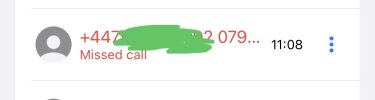
However if i try to return a call from missed call list, i get 'Ended Not Found: 441612223333'

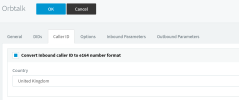
The SIP trunk has - Convert Inbound caller ID to e164 number format selected.

Ive tried Reformat Incoming or Outgoing Caller but cant seem to find a pattern solution to solve this. The call always displays as 441612223333 as it comes in.

Any ideas what i can do to resolve?

Thanks

Andy
 
HI Andy,

Presumably you want to leave the "Convert Inbound caller ID to e164" option enabled so you do not break inbound rules so your best bet is to reformat numbers using outbound rules.
Add an additional outbound rule on the op of what you already have and set so if it detects a number starting with 44 it will strip 2 digits and add a "0".
Something like this:
1674631713535.png
Give it a go and let us know if that works.
 
Hi

Ive tried this - still the same issue

Any other ideas? Would you like me to email logs?

Andy


1674637426454.png1674637426454.png
 
Are you sure you are matching the correct outbound rule when making calls?
 
Hi

I just done another test... I had tested a +44 format which had failed...

I tested a different call with 44 format which does work following your advice above.

I tried another rule to intercept starting with prefix +44 but this doesn't seem to work..

Is there a way to fix this element?1674645298879.png

1674645298879.png
 
Are you manually dialing the number? What position is your outbound rule at? Is your extension in the default group?
Can you send a screenshot of your outbound rules page?
I can assure you that your rule should work if matched by the PBX.
 
Hi

This is the setup - remove 44 works - the second one doesn't

Thanks

A1674723100525.pngndy


1674723100525.png
 
My extension is in default

1674723246811.png1674723246811.png
 
I am returning the call from the redial list not a manual dial. Manual dial works fine

In stripping digits - is +44 strip 3 digits or 2
 
I am returning the call from the redial list not a manual dial. Manual dial works fine
Does the number appear with the "+" in the redial list? Is E164 processing enabled in Settings / E164 Processing?
 
Some appear as +44 others as 44.

E164 processing is enabled

1674761179910.png

And in the SIP trunk

1674761268372.png
 
Hi,
Hi

I have a hosted 3cx solution. Incoming calls display as 441612223333 format -

Inbound Calls route correctly - including DDI related features.

Outbound calls can be made without issue using the format 01612223333

However if i try to return a call from missed call list, i get 'Ended Not Found: 441612223333'

The SIP trunk has - Convert Inbound caller ID to e164 number format selected.

Ive tried Reformat Incoming or Outgoing Caller but cant seem to find a pattern solution to solve this. The call always displays as 441612223333 as it comes in.

Any ideas what i can do to resolve?

Thanks

Andy
Hey Andy,

Did you manage to resolve this? I feel I may have a similar setup to this on a couple of 3CX vms running Twilio Trunks, and we’re all able to redial and make calls back to missed/received calls history records without any issues. I can share a couple of screenshots of my config if you’re still troubleshooting?

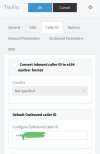
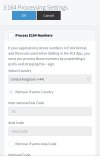
I don’t have “E164 processing” enabled in settings nor do I have “convert inbound caller ID to e164” enabled to start with.
 
Hi Maz

The screenshots would be great.. ive solved some formats but not all

Thanks

Andy
 
Hi Maz

The screenshots would be great.. ive solved some formats but not all

Thanks

Andy
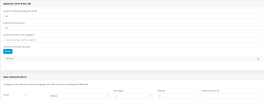
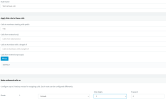
I’m on mobile atm - please excuse the small (but hopefully useful) screenies :)

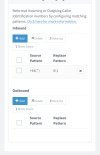
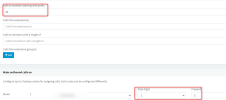
1st and 2nd screenshots are from the “SIP Trunks > Caller ID (tab)”

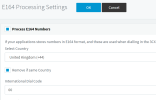
3rd screenshot is under “Settings > E164 Processing”

Whilst the final screenshot shows a missed call via the 3CX mobile app which users can just tap to call back directly without any issues. This includes deskphones aswell as all calls in the call history and not just missed.

I do have outbound rules, however screenshots on mobile do not look “easy” to read so I’ll try to explain…

Outbound rules
1st rule;
Calls to numbers with prefix starting with: 0
Strip Digits: 1
Prepend: +44
(Routes out via Twilio SIP trunk)

2nd rule;
Calls to numbers with prefix starting with: +44
(Just routes to my Twilio SIP trunk with no further entries)
 

Attachments

  • 178D0F87-8A7E-4AA9-BF4D-AA0B55B4DBFC.jpeg
    178D0F87-8A7E-4AA9-BF4D-AA0B55B4DBFC.jpeg
    335.2 KB · Views: 24
  • B9ABB848-3434-4F83-B683-7829CA7CEA5C.jpeg
    B9ABB848-3434-4F83-B683-7829CA7CEA5C.jpeg
    395.8 KB · Views: 25
  • 9587F4AE-6623-48EF-927D-FE9709BFA69B.jpeg
    9587F4AE-6623-48EF-927D-FE9709BFA69B.jpeg
    435.1 KB · Views: 23
  • 4DB629F2-2278-49B2-89B2-C40DB584DD1E.jpeg
    4DB629F2-2278-49B2-89B2-C40DB584DD1E.jpeg
    34.9 KB · Views: 25
Thanks so much..

Ill give it a try

Andy
 
Status
Not open for further replies.

Forum statistics

Threads
111,973
Messages
590,070
Members
164,890
Latest member
James Hacker