Solved inbound routing to wrong ring group

Status
Not open for further replies.

shavu

Customer
Joined
Feb 22, 2025
Messages
24
Reaction score
12
Hi,

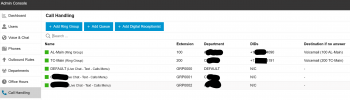
I have a sip provider with 2 DID. I created Ring-100 for 1 center. it is working for both in/outbound.
Then I created Ring-200 for another center with a different DID. Outbound works, extension to extension works. extension and transfer to Ring-B works.
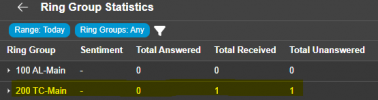
What doesn't work in inbound to Ring-200. Currently all incoming call is going to Ring-100.
I read that with v20, inbound tab/page is no longer there and inbound is automated. What should I check and how do I resolve this? Thank you.
3cx 2026-03-25 123749.png3cx 2026-03-25 124329.png
 
With v20, calls are routed based on the DID number dialed, ensuring that the DID format matches what the provider presents in the TO sip field within their invite header, which is generally in E164 format (e.g., +1234567890).
 
I have a sip provider with 2 DID. I created Ring-100 for 1 center. it is working for both in/outbound.
Then I created Ring-200 for another center with a different DID. Outbound works, extension to extension works. extension and transfer to Ring-B works.
What doesn't work in inbound to Ring-200. Currently all incoming call is going to Ring-100.
I read that with v20, inbound tab/page is no longer there and inbound is automated. What should I check and how do I resolve this? Thank you.
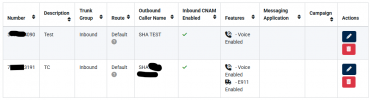
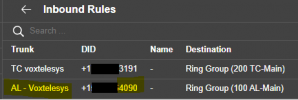
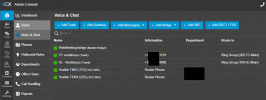
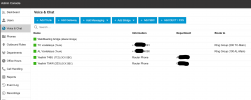
Your screenshot suggests you added a second trunk for the second DID. Are both trunks registration based and are you actually using Voxtelesys as your provider?
 
With v20, calls are routed based on the DID number dialed, ensuring that the DID format matches what the provider presents in the TO sip field within their invite header, which is generally in E164 format (e.g., +1234567890).
I am not sure what you mean, but I the number to TC (ring-group-100) works fine. I am just not sure what i need to configure in 3CX for it to route to the correct ring group.
1774577932070.png
 
Your screenshot suggests you added a second trunk for the second DID. Are both trunks registration based and are you actually using Voxtelesys as your provider?
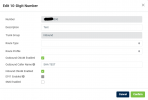
yes I am using Voxtelesys. I am not sure if you mean I have to set the option for registration, but I do have to use the sip registration information for ring-group-100 to work.
1774578078825.png
 
If (since) the DID was attached to the ring group, then one possibility is the number is not matching. Raise the log verbosity and it should show why/how it is routing the call.
 
Where do I raise the log options?
1774579027121.png
 
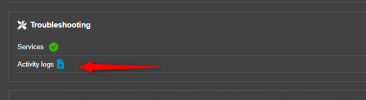
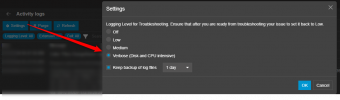
For verbose go to activity logs in order to enable, check steps below:

2026-03-27_05h47_18.png
2026-03-27_05h47_32.png
 
I am not even sure where to find that activity log. This could be because this is hosted by 3cx. I think though from the reports this might be a bug.
1774585388179.png
1774585451543.png

1774585500077.png
 

Attachments

  • 1774585304017.png
    1774585304017.png
    12.8 KB · Views: 1
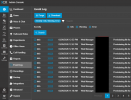
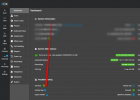
It's in the Dashboard:

1774585660092.png
 
Ah, Thank you! Looks like a long log. I will have to look through it to see where the problem might be. Not exactly sure what to look for, but i'll try. Thanks again.
 
  • Like
Reactions: TheodorosG_3CX
It should show the arriving call, the called DID number, and the routing decisions. The SIP trunk has to send the DID in the exact format that is entered in to 3CX. If it does not match, the call will use the default routing.
 
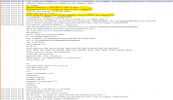
Below is what I think is where it started. It doesn't see an inbound rule for DID xxxxxx4090. How do I create this rule?


============================
1774623850966.png
 
@shavu do you have by any change a CID Rule to send calls from caller xxxxxx900 to extension 200 ?
 
Hi, I did not create any rules in CID.

1774626522861.png
 
@shavu on the screenshot you have from the Provider 's side, the number is 5xxxxxxxx090.
On the TO that comes from the Invite of the Provider, the number is +xxxxxxxx090.
Is the DID in the same format with + ?
As per our guide ?

https://www.3cx.com/docs/sip-trunk/voxtelesys-usa/

Step 2:​

  1. Go to the 3CX Web client and follow the guide on how to configure a SIP trunk.
  2. Enter the main trunk number and DIDs in the E164 number format, for example if your number is (888)-233-5678, it should be entered as +18882335678
 
Yes I confirmed it is as written in the instruction. The +1xxxxxx4090 setting is the same as +1xxxxxx3191 on both 3cx and voxtelesys. Voxtelesys only displays the E

1774627426006.png
1774627718703.png
 
Hi,

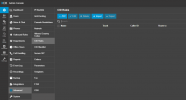
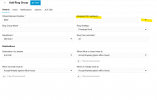
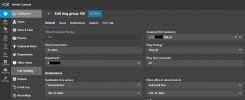
Go to the Ring Group configuration of the one not receiving calls and assign the relevant DID to it directly from there:

1774851742365.png
 
Check your numbers in Voxtelesys portal/ What options do you have for these 2 options?
1774938944441.png

Also go to Channels --> SIP Trunking and let us know if you have multiple Ingress / Customer Inbound and Egress / Customer Outbound trunk groups.
 
Status
Not open for further replies.

Forum statistics

Threads
112,139
Messages
590,930
Members
165,156
Latest member
streamservices