Solved Inbound rule`s name is not shown in switchboard

Status
Not open for further replies.

gustavskii

Joined
Jan 26, 2016
Messages
65
Reaction score
2
Hello

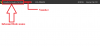
We recently found out that we do not have an inbound rule`s name displayed in switchboard (it is shown on 3cx client when a call hits an extension though)

In the attached screenshot it is shown like it was previously, right now it only shows number.

Is there a way to make it as it was previously?
 

Attachments

  • image001.png
    image001.png
    8.8 KB · Views: 21
Hello @gustavskii

In the management console navigate to Contacts / Options and make sure that the option "Prepend Name" is checked under the option "Add Group, Queue or DID/DDI Names to Caller ID"
 
@YiannisH_3CX
Yes it is selected as "Prepend Name" (screenshot.7)
But it still isn`t shown in switchboard (Screenshot.8)
But it does show in the client (Screenshot.9)

P.S. I rebooted 3cx instance, just in case
 

Attachments

  • screenshot.7.jpg
    screenshot.7.jpg
    104.3 KB · Views: 12
  • screenshot.8.jpg
    screenshot.8.jpg
    24.2 KB · Views: 10
  • screenshot.9.jpg
    screenshot.9.jpg
    36.3 KB · Views: 11
Last edited:
What version client are you using and can you try the same using the Web client? Does that have the same results?
 
@YiannisH_3CX
My client version is 15.5.12227.5 (Screenshot.10)
And even in WEB client, in switchboard, I do not see Rule name (Screentshot.11)
 

Attachments

  • screenshot.10.jpg
    screenshot.10.jpg
    41.8 KB · Views: 5
  • screenshot.11.jpg
    screenshot.11.jpg
    20.9 KB · Views: 5
As i can see from the screenshots of the switchboard the call is connected to the IVR but the screenshot from the client is after the call is connected. It should also be visible while the call is in the IVR but i am trying to understand what might be causing this behaviour.

With that in mind please send us a screenshot of the switchboard after the call has been answered by the extension. Also we will need a screenshot of the trunks Inbound rules and the call flow the call follows to reach the extension. e.g. Trunk ---> Inbound rule ---> IVR ---> extension.

If you route the call directly to an extension is the inbound rule name visible in the switchboard?
Make sure that under the switchboard settings all display options are enabled and try again.
 
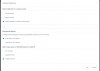
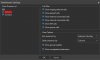
All options are enabled in settings of switchboard (screenshot.1)
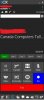
The Rule name still not shown in switchboard when answered by extension (screenshot.2) but it was shown in the 3cx client

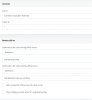
I send our Inbound Rule list (screenshot.4) and our inbound rule by CID (screenshot.3)

And flow is: Trunk ---> Inbound rule ---> IVR ---> Queue ---> Ext.
 

Attachments

  • screenshot.2.jpg
    screenshot.2.jpg
    34.5 KB · Views: 6
  • screenshot.1.jpg
    screenshot.1.jpg
    40.5 KB · Views: 4
  • screenshot.3.jpg
    screenshot.3.jpg
    88.6 KB · Views: 7
  • screenshot.4.jpg
    screenshot.4.jpg
    47 KB · Views: 7
I think i know why you are facing the issue. The PBX cannot match the incoming number to the DID rule and uses the CID rule instead.
I was able to replicate the behaviour once i saw the CID screenshot. Make sure that your DIDs are the same format the provider uses to send in the numbers. To overcome this i would recommend editing your DIDs and adding a "*" in front of the DID numbers. For example if your DID is 0123456789 make it *3456789 and leave the DID rule on top.
Let me know if that works
 
@YiannisH_3CX
I did set DID in the trunk as you said (*xxxxxxx) (screenshot.5), but Rule Name is still not shown in switchboard
 

Attachments

  • screenshot.5.jpg
    screenshot.5.jpg
    33.4 KB · Views: 6
Is there only one trunk on the system? If so how many DIDs does the trunk have?
 
@YiannisH_3CX
There are 6 trunks in the system, but this particular trunk has only one DID in the format you specified above (*xxxxxxx)
 
Are these trunks all from the same provider? Are the trunks registered or IP based? Do they use the same IPs/ Registrars? I am trying to figure out if the call could be coming from a different trunk and perhaps that is causing the issue.
 
@YiannisH_3CX
All trunks are from same provider
They are regostratregi based
They all share same registration ip
 
That could mean that the call is not actually matching the Inbound rule. Please try the following test:
While the PBX is configures the way it is now (DID rule on top CID rule below) change the destination of the DID rule to something else like a voicemail box of an extension.
Then call the number and see if the call is routed to the voicemail box of the extension or it still goes to the IVR.
 
@YiannisH_3CX
I put extension in destination (screenshot.6)
But it still goes to IVR
P.S. I tired to set both outside office hours and within, no difference
 

Attachments

  • screenshot.6.jpg
    screenshot.6.jpg
    47.9 KB · Views: 5
I put extension in destination (screenshot.6)
But it still goes to IVR
P.S. I tired to set both outside office hours and within, no difference
That tells us that the PBX does not actually match the call to the DID Inbound rule and it is using the CID to route the call.
Since you have 6 trunks from the same provider i am thinking that you have source identification issues and the call is routed to a random trunk.
What provider are you using? If it is a supported provider that we know the configuration we perhaps can determine what the correct settings should be for this to work properly.
 
@YiannisH_3CX
Almost all our trunks has different entry point, and they all routed to corresponding IVR
Also, when I delete CID Rule, it does rout through DID Rule (it goes to correct destination when I change it), but it doesn`t show the name (even in 3cx client)
 
Also, when I delete CID Rule, it does rout through DID Rule (it goes to correct destination when I change it), but it doesn`t show the name (even in 3cx client)
I am guessing that the destination is the one set under the main trunk number and the call is routed using the catch all functionality of the PBX. Even if you delete the Inbound rule also and the destination is set as the main trunk number destination under the trunk settings the call will still route to the destination. And the Inbound rule name will not be displayed.
Your source identification settings need adjusting on every trunk to have this working properly. However each provider is different and requires different configuration depending on how their Invite message is structured.
 
@YiannisH_3CX
Yes, you were right, we had to use our SIP ID as DID and not the associated number
After I switched it to that name started to show up again
Thank you
 
Glad to see the issue has been resolved and thank you for updating the thread with your solution.
 
Status
Not open for further replies.

Forum statistics

Threads
111,889
Messages
589,580
Members
164,755
Latest member
adrhoades