Incoming call issues using a HotDesking extension

Status
Not open for further replies.

Kwang Mien

Silver Partner
Advanced Certified
Joined
May 14, 2020
Messages
255
Reaction score
17
I have provisioned my Fanvil X3S to have a Hotdesking extension.

I entered *77*039* and entered the pin number. I heard the message that the phone is provisioned to extension 039.

Calling out from the Hotdesking phone has no issue.

However, when i tried to call to extension 039 from another extension, the message "record your message and press pound" was heard. A check on the 3CX management console showed that extension 039 is offline.

Can anyone advise are there any other steps needed to make the hotdesking extension go online to receive
calls ?
 
Are you running the latest FW on your Fanvil? and are you using the default template?
 
  • Like
Reactions: JohnS_3CX
Hi Kwang,

As per @kieferschild make sure the phone is on the correct firmware (if not, you will see a red warning in the Phones section for HD00001 for example).

Please note that the phone needs to reprovision itself as soon as you log in and this may take a moment. Once it does, refresh your extensions to see if it has registered. Do a factory reset and reprovision if you want to be sure.
 
Hi Kwang,

As per @kieferschild make sure the phone is on the correct firmware (if not, you will see a red warning in the Phones section for HD00001 for example).

Please note that the phone needs to reprovision itself as soon as you log in and this may take a moment. Once it does, refresh your extensions to see if it has registered. Do a factory reset and reprovision if you want to be sure.

After i login as extension 039 at the hotdesking phone, i heard "login successful. the phone will be reset to your account".

i checked there is no red warning in the phones section for HD00001 after i login.

When i check the extension page, the extension 039, it is still offline (not registered).

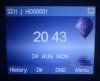
The phone display is still showing HD00001. Does this mean that the login is in fact not successful. it should have been displayed as 039 on the display instead ?
 

Attachments

  • phonedisplay.jpg
    phonedisplay.jpg
    429.6 KB · Views: 6
Are you running the latest FW on your Fanvil? and are you using the default template?

It is the latest firmware for Fanvil X3S.
May i know what default template are you referring to ?
 
Issues:

a. After login as extension 039 successfully on the Fanvil X3S phone which has been assigned a HotDesk Extension, the display still shows HD00001
b. In 3CX Management Console, the status of 039 is red meaning it is still offline
c. When I used another extension to call 039, i heard "Record your message and press pound". it went into voicemail.


Details of the System

3CX Version, e.g. Standard Annual 16.0.2.910
Professional Annual 8SC

Server OS, e.g. Debian 9 / Windows Server 2012 R2 / Raspberry Pi
Debian 9

Is the 3CX Server Hosted and where?
3CX Server hosted in our datacentre

IP Phone Make/Model/Firmware
Fanvil X3S
Firmware : 2.10.1.6836

Provisioning Method: Local / VPN / STUN / SBC
SBC

Trunk Provider or Gateway Make/Model
Not Applicable. It is a hotdesk issue.

Has the Firewall Checker passed: YES / NO
Yes

Are custom Phone Templates being used: YES / NO
No
 
Hi Kwang,

Did you select SBC here in the HD00001 extension and also enter the correct LAN IP of the SBC machine?

1598349607396.png
 
Hi Kwang,

It looks like the phone will not provision after you log in. This is not the expected behavior, so please to factory reset the phone and then when it appears in your Phones section in bold select it and click "Assign Ext". If the provisioning fails, then this would explain why hotdesking login also fails. If it works as expected, then try to login via hot desking again once the phone has been reset and reprovisioned.

Let us know what you find.
 
Hi Kwang,

It looks like the phone will not provision after you log in. This is not the expected behavior, so please to factory reset the phone and then when it appears in your Phones section in bold select it and click "Assign Ext". If the provisioning fails, then this would explain why hotdesking login also fails. If it works as expected, then try to login via hot desking again once the phone has been reset and reprovisioned.

Let us know what you find.

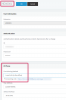
I reset the phone and reprovisioned it as a Hotdesking extension. I was able to login as 039 extension on the phone.When i login as 001 extension, the HotDesking Section showed that 001 is logged in. Please refer to (HotDesking Section image), but in the Phone Section, (Please refer to Phone Section image), it showed that it is still 039. The phone also displayed the extension as 039.

Kindly advise.

Thanks.
 

Attachments

  • HotdeskingSection.jpg
    HotdeskingSection.jpg
    6.1 KB · Views: 2
  • PhoneSection.JPG
    PhoneSection.JPG
    13.2 KB · Views: 2
It's good to be very clear and very specific when we are investigating.
Please follow my example below and report your results.
Every step below is important so we can have a very clear understanding!

1. Reset phone

2. Auto-provision it as HD00001
Result: phone screen, HD section, and Phones section showed user as "HD00001"

3. Login as EXT 039
Result: phone screen, HD section, and Phones section showed you as 039

4. You logged out
Result: phone screen, HD section, and Phones section showed user as "HD00001" ???

5. Login as EXT 039
Result: phone screen and Phones section showed you as 001, but HD section showed you as 039 ???


Some additional Notes: The Phones section page needs to be refreshed, it does not auto update. The Fanvil may take a moment to reprovision (up to 30 sec. is within normal bounds)
 
1. Reset phone

2. Auto-provision it as HD00001

3. Login Phone as 039 by dialing *77*039*.
Result:
Phone login as extension 039. Can call out and receive call

4. Login as 001 by dialing *77*001*
Result:
Phone screen still shows 039
Phone section showed user as 039. Refreshing the Phone section did not help
HD section shows 001 login

5. Logout by dialing *77*5*
Result:
Heard message "Extension not found".
Phone screen showed 039
Phone section shows 039.
HD section shows 001 login


Kindly advise.
 
Status
Not open for further replies.

Latest Posts

Forum statistics

Threads
111,961
Messages
589,953
Members
164,862
Latest member
ARTipsadmin