- Joined
- Jun 26, 2024
- Messages
- 46
- Reaction score
- 17
Hello all,
We have upgraded several of our customers to 3cx v20 and some of them have asked for us to change the incoming caller ID back to how it was.
Previously both incoming and ougoing calls only showed the number +123456789 (or the "Name(Extension)" format if it was an internal call) in the ringer where you could answer the phone.
Now something different is being shown, and we are asked to revert back to the way it was in v18.
Below are some screenshots of what is being shown.
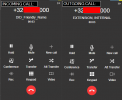
1. The dialers show the following:
On incoming calls they show the number, and the Friendly name of the DID that is dialed
On outgoing calls they show the number called and the first and last name or the internal extension that is calling the number:
This isn't that much of an issue, but if anyone knows I would like to know if this can be changed.
2. The call log shows the following:
On incoming calls the format of the string is "INCOMING_NUMBER:FRIENDLY_NAME_OF_INTERNAL_DID_DIALED INCOMING_NUMBER"
On outgoing number the format of the string shown is as following "LAST_NAME_OF_INTERNAL_EXTENSION, FIRST_NAME_OF_INTERNAL_EXTENSION OUTGOING_NUMBER"
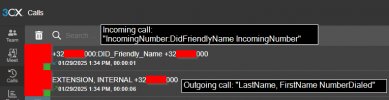
This is something we have recieved a request to change to show only dialed numbers on outgoing, and only numbers on incoming. Alternatively a CID from a phonebook would be acceptable as well.
Here is a screenshot of the basic extension settings used for these examples:
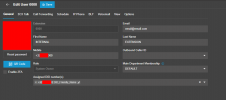
I have changed some parameters to remove any company info from here.
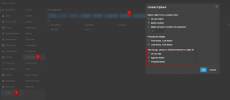
I did find this section in the trunk settings:
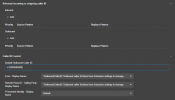
But as far as I understood from the documentation, the "Reformat Incoming or outgoing caller ID" only reformats the number that it is recieving or sending as part of the INVITE request. And the second part I have no idea what it does, I didn't notice any changes anywhere after trying to change these setting to all the provided values. Even tried restarting the services after the changes.
Any thoughts on how I can go about making the requested changes?
Thanks to all
We have upgraded several of our customers to 3cx v20 and some of them have asked for us to change the incoming caller ID back to how it was.
Previously both incoming and ougoing calls only showed the number +123456789 (or the "Name(Extension)" format if it was an internal call) in the ringer where you could answer the phone.
Now something different is being shown, and we are asked to revert back to the way it was in v18.
Below are some screenshots of what is being shown.
1. The dialers show the following:
On incoming calls they show the number, and the Friendly name of the DID that is dialed
On outgoing calls they show the number called and the first and last name or the internal extension that is calling the number:
This isn't that much of an issue, but if anyone knows I would like to know if this can be changed.
2. The call log shows the following:
On incoming calls the format of the string is "INCOMING_NUMBER:FRIENDLY_NAME_OF_INTERNAL_DID_DIALED INCOMING_NUMBER"
On outgoing number the format of the string shown is as following "LAST_NAME_OF_INTERNAL_EXTENSION, FIRST_NAME_OF_INTERNAL_EXTENSION OUTGOING_NUMBER"
This is something we have recieved a request to change to show only dialed numbers on outgoing, and only numbers on incoming. Alternatively a CID from a phonebook would be acceptable as well.
Here is a screenshot of the basic extension settings used for these examples:
I have changed some parameters to remove any company info from here.
I did find this section in the trunk settings:
But as far as I understood from the documentation, the "Reformat Incoming or outgoing caller ID" only reformats the number that it is recieving or sending as part of the INVITE request. And the second part I have no idea what it does, I didn't notice any changes anywhere after trying to change these setting to all the provided values. Even tried restarting the services after the changes.
Any thoughts on how I can go about making the requested changes?
Thanks to all