Incoming calls via car Bluetooth not working

Status
Not open for further replies.

m.boerebach

Customer
Joined
Feb 17, 2021
Messages
4
Reaction score
2
Hello forum users,
I'm currently struggling with reports from multiple users not being able to use their car bluetooth feature to receive incoming calls.
The issue is the following:
When they are connected with their car bluetooth (BMW) and receive an incoming call the car display shows the incoming call as if it had already been accepted. The display only shows the name of the receiving user not of the one who called and the only option that is displayed is to end the call even though they never hit accept or anything. While this is going the Android phone (Samsung) shows the 3cx app with the option to answer or decline the call and the name of the one who calls. If they then accept the call via the phone directly everything works fine, but since it is not an option to use your phone while driving this is not an acceptable solution.
Has anyone else experienced this issue and knows a workaround?
Regards
 
Hi, Can you check this in another car and maybe with another phone? Certainly something we wish to fix but for example i have a google pixel with a jeep and its working fine. Lets us know Samsung model and BMW model and try to vary both and based on that we can revert.
 
Hi @m.boerebach,

To help us assist and troubleshoot the issue you are describing please provide the following details:
(a) 3CX PBX and app version.
(b) Mobile device model and Android version.
(c) Is the 'Car/Bluetooth support (Telecom API)' option in 'Settings' > 'Advanced' enabled?
(d) If possible, the car bluetooth device model for further investigation and reference.
(e) A verbose log from the 3CX app when this issue occurs.

As soon as you can provide these details we can start investigating this issue.
 
Hi @m.boerebach,

To help us assist and troubleshoot the issue you are describing please provide the following details:
(a) 3CX PBX and app version.
(b) Mobile device model and Android version.
(c) Is the 'Car/Bluetooth support (Telecom API)' option in 'Settings' > 'Advanced' enabled?
(d) If possible, the car bluetooth device model for further investigation and reference.
(e) A verbose log from the 3CX app when this issue occurs.

As soon as you can provide these details we can start investigating this issue.
Hi KyriakosP:
a). PBX version is 16.0.8.9 app version is latest available option
b). Samsung Galaxy S9
c) This option is unavailable on this phone. I've tried to connect another Galaxy S20 phone which does show this feature in settings.
d) It's a BMW x1 with a non Android Auto multimedia system, so just a basic bluetooth handsfree radio system.
e) How would I acquire said log? Then I'd try to gather that information.
 
Hi @m.boerebach,

Sent you a PM so I can provide you with more targetted info to troubleshoot this issue.
 
Bluetooth doesn't work for me in both a 2019 Tesla Model 3 and a 2013 Land Rover Discovery. In both cases, the the car speakers ring and pressing answer on the car controls does answer the call, but in-call audio is still played out over the phone's speaker.

(a) 3CX PBX and app version.
16.0.8.9

(b) Mobile device model and Android version.
Oneplus 8 Pro (IN2023), Android v11 (Oxygen OS 11.0.4.4.IN11BA)

(c) Is the 'Car/Bluetooth support (Telecom API)' option in 'Settings' > 'Advanced' enabled?
Yes.

(d) If possible, the car bluetooth device model for further investigation and reference.
No idea. Sorry.

(e) A verbose log from the 3CX app when this issue occurs.
Will do this the next time I use the car.
 
Bluetooth doesn't work for me in both a 2019 Tesla Model 3 and a 2013 Land Rover Discovery. In both cases, the the car speakers ring and pressing answer on the car controls does answer the call, but in-call audio is still played out over the phone's speaker.

(a) 3CX PBX and app version.
16.0.8.9

(b) Mobile device model and Android version.
Oneplus 8 Pro (IN2023), Android v11 (Oxygen OS 11.0.4.4.IN11BA)

(c) Is the 'Car/Bluetooth support (Telecom API)' option in 'Settings' > 'Advanced' enabled?
Yes.

(d) If possible, the car bluetooth device model for further investigation and reference.
No idea. Sorry.

(e) A verbose log from the 3CX app when this issue occurs.
Will do this the next time I use the car.
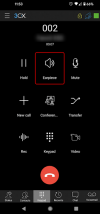
Your case might be slightly different. After you have answered the call, could you try pressing the "Earpiece" button? Pressing it cycles through all audio devices, so see if at some point you see an option for "Bluetooth", and if yes, if you have audio then.
Obviously please don't do this while driving...!!!
1614679096515.png
 
  • Like
Reactions: KyriakosP
Hi @NicholasBarnes,

We happen to have this exact Android device in our test rig and we noticed that Bluetooth issues appeared or were resolved upon installing new OS / firmware updates. Along with the tip from @NickD_3CX, please check if your device has the latest OS / firmware update installed.
 
Status
Not open for further replies.

Members Online Now

No members online now.

Forum statistics

Threads
111,832
Messages
589,284
Members
164,662
Latest member
DejanMDS