Incorrect count of abandoned calls

LUXUA

Premier Customer
Joined
Mar 9, 2022
Messages
21
Reaction score
2
Hi,

3CX Version 20.0 Update 6 (Build 724 Release) (On-Premise)
1753867478029.png

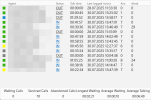
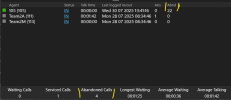
Softphones show the different info:

3CX 5.2 (Build 967) 20.0.967.0
Agent 1: Ans=6, Abnd=29
Agent 2: Ans=5, Abnd=24

3CXPhone for Windows 16.3.0.264
Agent 1: Ans=6, Abnd=28
Agent 2: Ans=5, Abnd=0

3CX Desktop App 18.13.959
Agent 1: Ans=6, Abnd=28
Agent 2: Ans=5, Abnd=0

What's wrong with a new softphone?
 
Hi,

What does the web portal/PWA show?
 
Hi,

What does the web portal/PWA show?
The same as 3CX 5.2 (Build 967) 20.0.967.0
Agent 1: Ans=6, Abnd=29
Agent 2: Ans=5, Abnd=24

What is the reason for such a difference? Another question. How can I find the abandoned calls within reports? It looks very strange. The agents couldn't miss such many calls.
 
That would be how many times calls reached their extension (polled) - one call may reach an agents extension multiple times depending on how a queue is set-up.
This is a change from the logic of older versions, to better represent an agent's performance - how many times their phone rang vs how many times did they pick up.
 
That would be how many times calls reached their extension (polled) - one call may reach an agents extension multiple times depending on how a queue is set-up.
This is a change from the logic of older versions, to better represent an agent's performance - how many times their phone rang vs how many times did they pick up.
What type of report can confirm that the agents abandoned the calls?
 
The Abandones Queue Calls report gives the highest detail on this, Detailed Queue Statistics will provide a per queue view - no agent details.

Queue Performance Overview will be where you get the info you want (as I understand it), more clearly. It shows the total call into a queue, how many answered, how many unanswered and then breaks it down by agent, showing how many each agent picked up vs how many times their phone was polled overall.
 
The Abandones Queue Calls report gives the highest detail on this, Detailed Queue Statistics will provide a per queue view - no agent details.

Queue Performance Overview will be where you get the info you want (as I understand it), more clearly. It shows the total call into a queue, how many answered, how many unanswered and then breaks it down by agent, showing how many each agent picked up vs how many times their phone was polled overall.
Abandoned Queue Calls - No Data

This is because

1753873832777.png

Detailed Queue Statistics
Abandoned Calls = 0

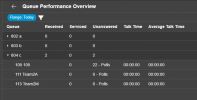
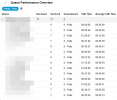
Queue Performance Overview
Unanswered = 0 - Polls (all agents)

What's wrong? How did we get the abandoned calls by the agents?

1753874168602.png
 
I think you are, but for overall clarity, are you viewing the same date range in each report?

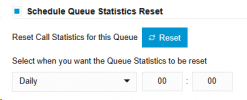
In the Panel view (This data is since last reset of queue statistics) Abandoned Calls are calls the were never answered - while app displays polling attempts..

Reports use date ranges. Again these would show 0 if all calls were ultimately answered.

There is perhaps a confusion as the abbreviation "Abnd" in the app's panel is in the latest version showing polling attempts, where in other places Abandoned referrers to completely missed calls.
The meanings are in one case is that the agents phone rang and they abandoned it, the other is that the user dropped the call / queue run out of time so the call was abandoned in the other direction.

1753874908554.png
 
What type of report shows the polling attempts according to the panel info?
 
Queue Performance Overview :
1753876059291.png
 
Please show me

1753877876476.png
 
It only reports polling attempts in the case of unanswered calls.
 
It only reports polling attempts in the case of unanswered calls.
So I will ask you again. What type of report shows the polling attempts according to the panel info?
 

Forum statistics

Threads
111,957
Messages
589,929
Members
164,861
Latest member
LewisJC