Installing Live Chat

KaterinaK_3CX

Joined
Feb 24, 2016
Messages
246
Reaction score
36
The 3CX Live chat software allows you to answer calls and messages from website visitors directly from 3CX. This guide walks you through configuring live chat in 3CX and enabling it on your website.

Read the guide.
 
Is it possible to have bidirectional communication using live chat, where an agent able to start a session with a customer?

I understand it would need to be implemented from our side, we have the ability to put resource into it, but wondering if something already available out of the box, or advice us in right direction.
 
Is it possible to have bidirectional communication using live chat, where an agent able to start a session with a customer?

I understand it would need to be implemented from our side, we have the ability to put resource into it, but wondering if something already available out of the box, or advice us in right direction.
Hi!
No, the implementation we have done requires that the chat be initiated by the Web Visitor, only then can a 3CX user reply and have a conversation.
 
  • Like
Reactions: FridayIT
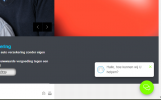
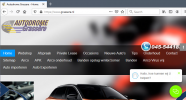
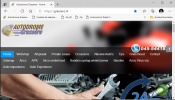
I have installed the live chat on our Joomla Websites : www.grassere.nl and www.pcagrassere.nl.
I see that in the same time on different Browsers the chat is working and not working.
It is during time that we are open.. so that could not be the problem.
I see in Egde and Safari that this happens more often... what can we do to solve this?
 

Attachments

  • Edge_not_working_fine.PNG
    Edge_not_working_fine.PNG
    36 KB · Views: 20
  • working_fine.PNG
    working_fine.PNG
    124.8 KB · Views: 19
I have installed the live chat on our Joomla Websites : www.grassere.nl and www.pcagrassere.nl.
I see that in the same time on different Browsers the chat is working and not working.
It is during time that we are open.. so that could not be the problem.
I see in Egde and Safari that this happens more often... what can we do to solve this?
What callus link have you used? Is it that of an Extension or a Queue?
When this happens, can you confirm that:
  • The Extension is logged, or if a Queue, that there are agents logged in and available?
  • That the PBX is operational and reachable from the website?
 
What callus link have you used? Is it that of an Extension or a Queue?
When this happens, can you confirm that:
  • The Extension is logged, or if a Queue, that there are agents logged in and available?
  • That the PBX is operational and reachable from the website?
The link we use : https://mypbx.3cx.nl:5001/callus/#livechat
The live chat is connected to a Call Queue
The extension is logged and the agents are available at the time of the test
The PBX is operational and reachable at the time of the test
The test is done simultaneously on different Browsers and computers and have different out comes
 
The link we use : https://mypbx.3cx.nl:5001/callus/#livechat
The live chat is connected to a Call Queue
The extension is logged and the agents are available at the time of the test
The PBX is operational and reachable at the time of the test
The test is done simultaneously on different Browsers and computers and have different out comes
Ok, from one of the computers that has the problem, can you try to access the 3CX Management Console login page?
So in a new tab just try to go to https://<3CX FQDN>:5001/ . Will it show you the page?
 
Ok, from one of the computers that has the problem, can you try to access the 3CX Management Console login page?
So in a new tab just try to go to https://<3CX FQDN>:5001/ . Will it show you the page?
Yes it shows the login page of the 3CX
 
Yes it shows the login page of the 3CX
Ok, and if you try to login? Does it let you?
One reason this could happen is if there are IPs blacklisted.

If this doesn't help, try restarting all the 3CX Services and check again.
 
Ok, and if you try to login? Does it let you?
One reason this could happen is if there are IPs blacklisted.

If this doesn't help, try restarting all the 3CX Services and check again.
yes it lets me in
 
Now I see it online from multiple IPs that I tried:
1616596904269.png
 

Attachments

  • Knipsel.PNG
    Knipsel.PNG
    573.8 KB · Views: 10
I have a hunch, so please help me out here.
In your browser, are you accessing the website as https://www.grassere.nl , or as https://grassere.nl .

If you can access the website in both ways, or if there is a redirect, in the Management Console --> Messaging, in the Live Chat, you need to enter all different combinations, so you would have to have:
Code:
https://grassere.nl;https://www.grassere.nl;https://pcagrassere.nl;https://www.pcagrassere.nl

Can you check please that you have all combinations, for all websites, with and without www ?
 
I have a hunch, so please help me out here.
In your browser, are you accessing the website as https://www.grassere.nl , or as https://grassere.nl .

If you can access the website in both ways, or if there is a redirect, in the Management Console --> Messaging, in the Live Chat, you need to enter all different combinations, so you would have to have:
Code:
https://grassere.nl;https://www.grassere.nl;https://pcagrassere.nl;https://www.pcagrassere.nl

Can you check please that you have all combinations, for all websites, with and without www ?
Yes this solves the problem... great help
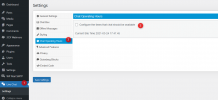
Were can i find this :
Administrators can configure the Live Chat operating days and hours.

  1. Go to “Live Chat > Settings > Chat Operating Hours” and enable “ Configure the times that chat should be available”
  2. Configure the respective days and working hours.
 
Yes this solves the problem... great help
Were can i find this :
Administrators can configure the Live Chat operating days and hours.

  1. Go to “Live Chat > Settings > Chat Operating Hours” and enable “ Configure the times that chat should be available”
  2. Configure the respective days and working hours.
1616600541632.png
 

Attachments

  • Knipsel.PNG
    Knipsel.PNG
    55.4 KB · Views: 15
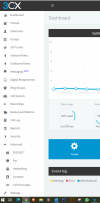
You don't see it because the screenshot you sent is from the 3CX Management Console. This settings is in the Wordpress Admin page which is where I got the screenshot from.
 
You don't see it because the screenshot you sent is from the 3CX Management Console. This settings is in the Wordpress Admin page which is where I got the screenshot from.
I use the Joomla SNIPET , our websites are Joomla based...
 
I use the Joomla SNIPET , our websites are Joomla based...
In that case you don't have this option.

The alternative is, you could configure play with the Office Hours of your PBX.
As your callus link is pointing to a Queue, if all Agents are logged out, visitors should get the option to leave an offline message which the agents will see in the Queue when they log back in.
 
In that case you don't have this option.

The alternative is, you could configure play with the Office Hours of your PBX.
As your callus link is pointing to a Queue, if all Agents are logged out, visitors should get the option to leave an offline message which the agents will see in the Queue when they log back in.
oke, i wil try that... and we see afterwork how it wil work.
Thank you for the nice and quick help
 
  • Like
Reactions: NickD_3CX

Forum statistics

Threads
112,147
Messages
590,959
Members
165,167
Latest member
Finatra.us