Integration with no Leads in Salesforce

flash999

Premier Customer
Joined
Mar 27, 2019
Messages
48
Reaction score
9
We don't use Leads and there is no Leads object in Object Manager in Salesforce
When we try to test SF integrating from 3CX we get errors like this

Server returned a non successful status code - HTTPStatusCode=BadRequest - Reason=Bad Request - Content=[{"message":"\nLead(Id,FirstName,LastName,Title,Fax,MobilePhone,Phone,Email,Company)\n ^\nERROR at Row:1:Column:74\nNo such column 'Fax' on entity 'Lead'. If you are attempting to use a custom field, be sure to append the '__c' after the custom field name. Please reference your WSDL or the describe call for the appropriate names.","errorCode":"INVALID_FIELD"}]

Any idea what would be the easiest way to resolve this ?
 
Hi there, the error in the log above is related to the field FAX on entity Lead.

You need to make visible the field in Salesforce, maybe you can try this:
  • Go to “Setup Home > Objects and Fields > Object Manager > Lead > Fields.”
  • Click on the field that you want to make visible, for example “Fax”.
  • Press the “View Field Accessibility” button on the upper right side of the screen.
  • Click on the “Hidden” label on the right of “Standard User” (or the profile of the user configured for the integration).
  • Under the “Field-Level Security” check the “Visible” option.
  • Repeat the procedure for other fields or entities causing the same error.
 
As I said we don't use Leads in SF
We don't have “Setup Home > Objects and Fields > Object Manager > Lead"

What I was able to find is that Leads was renamed to Prospects in our SF

Is there an easy way to make 3CS look only in Contacts and Accounts and not to look in Leads at all
Or if its not possible to make it look in Prospects instead of Leads ?
 
Last edited:
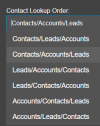
yes but what is your contact lookup order?

1737397647551.png

if you have only contacts, then make sure the order as first one is Contacts.

Also, you should be using the Salesforvev2 default template and not a custom or old template.
 
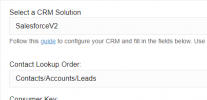
Yes we have Contacts first and we are using Salesforvev2 default template
But it still returns this error from Leads when we test

1737397813462.png
 
in the TEST button, enter a number that exist as CONTACT in the entity contacts, what is the result?

In Salesforce you have 3 entities: Contacts, Leads and Accounts and for each lookup scenario the system define with the EntityId attribute, which entity is this scenario searching for. Then, the EntityOrder attribute takes the value from your configuration Contacts/Accounts/Leads

Anyway, make sure that the fields used in the template like fax, home phone, etc are visible for each entity as mentioned in my previous response
 
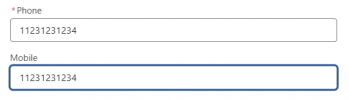
I have a test contact with this number

1737399098162.png

I tried to do a Test from 3CX both with this full number and without 1, but in both cases it couldn't find the Contact

Can it be because of Step 4 here https://www.3cx.com/docs/salesforce-crm-integration/ ?

Where is
  1. ⚠ Important: In 3CX Management Console, open “Advanced” > “Contacts” > “Options”. Set the matching strategy to "Match exactly" when possible (E164 format required in Salesforce and the SIP Trunk), or “Match at least X number of characters” and set the value to 7.

In v20 ?
 
I have a test contact with this number

View attachment 46053

I tried to do a Test from 3CX both with this full number and without 1, but in both cases it couldn't find the Contact

Can it be because of Step 4 here https://www.3cx.com/docs/salesforce-crm-integration/ ?

Where is
  1. ⚠ Important: In 3CX Management Console, open “Advanced” > “Contacts” > “Options”. Set the matching strategy to "Match exactly" when possible (E164 format required in Salesforce and the SIP Trunk), or “Match at least X number of characters” and set the value to 7.

In v20 ?
System > Phonebook > Options.

And FYI, even if Leads is Prospects in your UI, the API entity name doesn't change so it would still work, thus the field error for the Fax.
 
We don't really use Prospects so we changed it back to Leads
We no longer get the error message, but as I said before when we do Test with 11231231234 its not finding it
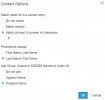
These are our Contact Options

1737399619565.png
 
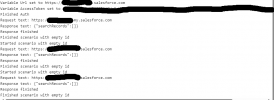
I'm not sure why I see this in the CRM Log of the Test

1737471295641.png


I thought that I suppose to see the number I'm looking for in the request text ?
 

Forum statistics

Threads
112,147
Messages
590,961
Members
165,167
Latest member
Finatra.us