Intercom not auto-answering the call anymore

Status
Not open for further replies.

Helpdesk-SW-IT

Silver Partner
Joined
Sep 23, 2022
Messages
24
Reaction score
0
I am lost... :(

We have replaced an old Yealink DECT phone + antenna (unfortunately I don't know the old model anymore) with a new Yealink W76P combo.
Since then I have had the following problem:
When people call each other via speed dial (in our case *11+extension) without having to pick up (intercom), the call simply rings on the extension instead of being picked up automatically.
Nothing has been changed in the extension authorisations, but I have activated the "can Intercom" function again via the group and on each extension. At some point I was so desperate that I really thought it was the model, so I integrated the same model into our 3CX and it works there without any problems. But not with the customer, even though I compared all the settings. Several factory resets, new extensions, update to the latest v18 version but no chance, created paging ring groups, the call rings through. Even if the option is activated on the handset in the settings...
Has anyone ever had a similar case or perhaps knows the option that could save me?

Thanks in advance! :)

Liam :)
 
Hello

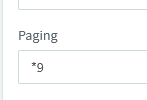
confirm that your "Paging" code is *11 (default is *9)

Check the rights in the users settings instead to ensure that the user is the correct role.
 
  • Like
Reactions: Helpdesk-SW-IT
Hello

confirm that your "Paging" code is *11 (default is *9)

Check the rights in the users settings instead to ensure that the user is the correct role.
Hi,

Thanks for the reply. :)
Yes its *11, I checked it in the Speed Dial settings.. Even changed it to *9 but got the same behaviour.. :)
Double checked User and Group settings.. All seem right :)

Kind regards,

Liam :)
 
Ignore the speed dial settings.

go in to the management console > Settings > Dial Codes

what is the dial code that's specified under paging?

1701873873673.png
 
  • Like
Reactions: Helpdesk-SW-IT
Are you trying to intercom a DECT phone? Because I dont think thats possible.

https://helpdesk.telebroad.com/supp...p-intercom-calls-between-dect-phones-handsets

can you check this setting on the phone?

Hi,

The Intercom it's from Yealink Deskphone > Dect.
checked the settings already, even if its activated I have no chance. :) I also thought that it was not possible with th model, but when i added the phone in our 3CX it works perfect as previewed.. :) Also with Yealink Desk Phone > Dect.

Kind regards

Liam :)
 
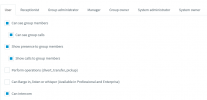
Are both users in the same group? Can you send a screenshot of group rights?
 
Are both users in the same group? Can you send a screenshot of group rights?
Both in the same group, even tried to create a new extension.. :)

Screenshot:Intercom.PNG
 
What if you create a new extension?

are you able to intercom any other phone?
 
What if you create a new extension?

are you able to intercom any other phone?
New extension in the same group same error when connected to the DECT.
Yealink Deskphone > Yealink Deskphone can intercom like a charm
 
maybe try a pbx reboot then?
 
  • Like
Reactions: Helpdesk-SW-IT
Was paging working the way you want it, between other extensions on that system, before you replaced this set? You seem to indicate that it does not work at all on this system now after you replaced that one set. Is that the case?
 
  • Like
Reactions: Helpdesk-SW-IT
Does paging work the way you want it, to other extensions on that system? It's just that one phone that has an issue?
Other phones not doing an issue. But paging on the phone works, tested it in our 3CX. So it's not a hardware related issue/firmware/setting one the DECT phone. :)
 
Cold it be the "location" , on the network, that is causing the issue? How complicated is the local network set-up...multiple switches, any subnets, etc.? Have you looked at the 3CX Activity Log, in Verbose (compared to the log from your system where it works), for any clues?
 
  • Like
Reactions: Helpdesk-SW-IT
Cold it be the "location" , on the network, that is causing the issue? How complicated is the local network set-up...multiple switches, any subnets, etc.? Have you looked at the 3CX Activity Log, in Verbose (compared to the log from your system where it works), for any clues?
Really simple network, just 3CX and phones in a seperate VLAN. :) The old DECT antenna was connected on the same cable/port.. :)
 
Did you have a look at the Activity Log?
 
Did you have a look at the Activity Log?
I see the follwing entries:

12/07/2023 9:26:02 AM - [CM503003]: Call(C:7): Call to <sip:[email protected]:0> has failed; Cause: 487 Request Cancelled/INVITE from 10.1.20.10:5060
12/07/2023 9:24:52 AM - [CM503003]: Call(C:6): Call to <sip:[email protected]:0> has failed; Cause: 487 Request Cancelled/INVITE from 10.1.20.10:5060

 
What device is 10.1.20.10?
 
Status
Not open for further replies.

Forum statistics

Threads
111,974
Messages
590,081
Members
164,899
Latest member
mazet