Intermittent callers on the other end can't hear me

Status
Not open for further replies.

Youdjin

Customer
Joined
Apr 19, 2022
Messages
18
Reaction score
1
Hi Guys,

i just setup the 3cx in my office for about 18 users, using Telnyx as Sip trunk, its been about a month and everything works except for the fact that users are telling me that callers are not able to hear my users sometimes or they hear them very low, even thou the user is speaking into the mic. The pbx is hosted by 3cx, and i have an sbc onsite. All the gear is behind UDM pro. Speed 1Gb up / 1gb down Att, Voip and Data on its own vlan. I did not enable Smart queues. Sip alg is disabled, H.323 also disabled. PBX deliver's audio on extensions is disabled. and for the last resort i even disabled PBX delivers audio on the Sip trunk as well. i'm running out of options here, and my users start getting a little frustrated ;P, can somebody help with this?
 
Last edited:
Are all of the sets that same make? Which? Have you tried using a 3CX Android, iOS App? What Codec are you using? If a call goes to voicemail, how is the level, for the caller?
 
Are all of the sets that same make? Which? Have you tried using a 3CX Android, iOS App? What Codec are you using? If a call goes to voicemail, how is the level, for the caller?
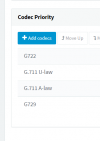
the phones are 8 Yealink T-54w and 2 Fanvil's. Codes order are set to PCMU, PCMA, G722, G729, i left them as default didn;t mess with codecs. On te Sip side its set to 1650396717432.png
 
Are all IP Phones on the same site? What machine is hosting the SBC, what OS is it running and what specs? Also, what SBC version are you running?

Have you noticed if this only occurs for external calls or may it affect internal (extension-to-extension) calls too?

Note: If all internal calls are between IP Phones on the same SBC site and you do not record calls nor have PBX delivers audio enabled then this might not be a valid test as the audio would go directly from one IP Phone to the other.

As a quick test you can enable call recording, wait for the issue to occur and when it does, listen to the recording of that call to determine if what you hear matches what the caller reported. Since the recording takes place on the PBX, this info might prove useful to narrowing down where the problem may be originating.
 
Hi Chris,
yes, all the phones are at the same site, for SBC i'm using a raspberry pi, version 18.1.36. They don't really use internal calls as the office is very small, i forgot to mention, there are total of 18 users but only a group of 7 which are split in a ring group are having the issue. haven;t heared anything else from the other 11 users. they make and receive external calls mostly since its a dispatch office. its very hard to narrow down on which calls it happens since the call volume is sometimes high.
 
Are all IP Phones on the same site? What machine is hosting the SBC, what OS is it running and what specs? Also, what SBC version are you running?

Have you noticed if this only occurs for external calls or may it affect internal (extension-to-extension) calls too?

Note: If all internal calls are between IP Phones on the same SBC site and you do not record calls nor have PBX delivers audio enabled then this might not be a valid test as the audio would go directly from one IP Phone to the other.

As a quick test you can enable call recording, wait for the issue to occur and when it does, listen to the recording of that call to determine if what you hear matches what the caller reported. Since the recording takes place on the PBX, this info might prove useful to narrowing down where the problem may be originating.
Hi Chris,
yes, all the phones are at the same site, for SBC i'm using a raspberry pi, version 18.1.36. They don't really use internal calls as the office is very small, i forgot to mention, there are total of 18 users but only a group of 7 which are split in a ring group are having the issue. haven;t heared anything else from the other 11 users. they make and receive external calls mostly since its a dispatch office. its very hard to narrow down on which calls it happens since the call volume is sometimes high.
 
I doubt the fact that they are in a Ring Group has anything to do with it so maybe think if these users have any other commonalities between them.

I do recommend you consider what I mentioned about enabling call recording though, all you'll need after that is for someone to report the issue again and give you info on what was experienced during the call so that you can match that with what you hear in the call recording of that same call.
 
I doubt the fact that they are in a Ring Group has anything to do with it so maybe think if these users have any other commonalities between them.

I do recommend you consider what I mentioned about enabling call recording though, all you'll need after that is for someone to report the issue again and give you info on what was experienced during the call so that you can match that with what you hear in the call recording of that same call.
Chris,
i have the standard license and recording is greyed out for me, unless i'm looking in the wrong settings.
 
Chris,
i have the standard license and recording is greyed out for me, unless i'm looking in the wrong settings.
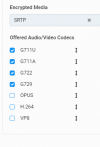
Hi Chris, i went through all the settings again to doublecheck for potential misconfig, so i found that on my siptrunk in the pbx the codec order is set to G722 as top priority, could this be a potential issue?
1650405799570.png
 
Since the sets would appear to use G711U as the first choice, you could see if changing the trunk setting to the same makes a difference. It is always best to use the same Codec "all the way through", if possible. You might also check to see, in the Activity Log (Verbose), if transcoding was happening.
 
Last edited:
  • Like
Reactions: ChrisC_3CX
Since the sets would appear to use G711U as the first choice, you could see if changing the trunk setting to the same makes difference. It is always best to use the same Codec "all the way through", if possible. You might also check to see, in the Activity Log (Verbose), if transcoding was happening.
Thanks, i'll give it a try. i remember i changed it a while back due to call issues as well. i'll change it back to see if it helps.
 
Also forgot to mention, we have the ATT fiber router BGW320 set to passthrough mode and wifi off, should that be a potential issue ?
 
Also forgot to mention, we have the ATT fiber router BGW320 set to passthrough mode and wifi off, should that be a potential issue ?
Provided the network configuration is in order and you generally do not have any issues on the network level due to misconfiguration it should not be an issue no.
 
Status
Not open for further replies.

Forum statistics

Threads
111,974
Messages
590,083
Members
164,900
Latest member
Silent_Guru