invalid CONSOLE login attempts not considered in IP blacklist ?

Status
Not open for further replies.

kwen1x

Customer
Joined
Jun 5, 2020
Messages
55
Reaction score
12
Hi,

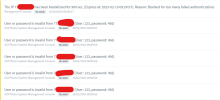
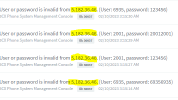
I see the eventlog that is (over)loaded with 30037 events: User or password is invalid from .. (3CX Phone System Management Console).
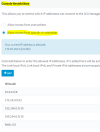
Console access has been restricted to limited list of IP addresses, yet console page is still 'accessible' from internet ??
However, if I try to connect with VALID admin credentials, the connection is refused.
Seems odd 'implementation' of this IP restriction option.

Furthermore an event 30037 is logged when INVALID credentials are detected, yet these attempts do not result in the IP address in question being put on the IP blacklist ??
Only events 12290 (as far as I've seen) trigger their IP address being added to blacklist...

Why not blacklist illegal admin console attempts ?
 
It's morethanlikely they're not hitting your threshhold for failed login attempts.
 
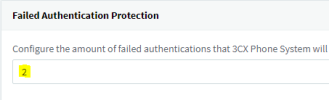
Thanks for the suggestion kieferschild, but I lowered the lockout treshold to 2 attempts, were I saw that even the attempts were more then what the default threshold (3) was.

It seems to me these 'attempts' are simply NOT taken into account.

It used to be that the console restrictions forced nginx to spit out some kind of error page, but this release xx this has changed into a valid login page that is presented (but where valid logins are refused when IP address not in whitelist), which opens the window for these fraudulent login attempts.

You can try for yourself and try to login x times with wrong console password from IP address that is not in the console whitelist: you will see...(I hope)
 
Update..

Make sure that youre not testing this anti-hack feature from an IP that is in your allowed list for MGMT console.

If you set your MGMT console restriction to access from anywhere then the desired result is acheived.

1676020282224.png

If you lock down MGMT console to IPs then these attempts from non-allowed IPs arent registered at all.
 
Last edited:
thanks for testing this.
Can you confirm what your threshold is ?

1676020780120.png
 
I set mine to 5
 
1676021598600.png

which is default IP list, yet I get all of these..

1676021656729.png

something wrong in nginx config ?!
 
running v18.0 (Build 908)
 
nginx settings (nginx.conf in /var/lib/3cxpbx/Bin/nginx/conf folder) don't seem in sync with gui ?
nginx should return an error 403, as far as I can read confg..
Or am I reading wrong setting ?

1676022920867.png
 
  • Like
Reactions: nub
I am have the same problem. My console restrictions are allowing access from internal network only.
Same version of the software v18.0 (Build 908)
I have manually blocked the IP's, that silenced for now.
 
I also have this problem and have restricted IP and still receive a lot of attempts.
When I try to connect from another IP I'm blocked, but still other doesn't get blocked.
 
I'm also on Update 6 and have console restrictions for specific IP addresses set but am able to browse the login page from external addresses outside of the allowed ranges and the event logs show that other can as well.
 
The Management Console login page loads but you can't login, you might expect the page not to load at all. The event log reports failed login from the webclient but this is possibly misleadingly as it appears that those attempts were the Management Console.
 
3CX, I understand this is probably based on the service but it would be good if it could distinguish between Management Console and Webclient.

3cx.png
 
  • Like
Reactions: SteveITS
Console restrictions were designed to allow you to reach the login prompt, but nothing you enter will work.
It should not return 403.

The anti-hacking module is for SIP attempts, not for web login.

If your goal is to protect the management console login, then use stongs passwords, and enable console restrictions.
The attempts will always appear, but they will of course fail.
Just make sure you don't lock yourself out!
 
Noticing a lot of fail attempts same IP address as above. They are hitting several consoles with failed passwords.
 
>>The anti-hacking module is for SIP attempts, not for web login.
Then this should be clarified in interface...
Hacking is hacking (for me), be it on SIP attempts or console login.
From security perspective it would be more sensible to handle BOTH cases, no ?
 
Console restrictions were designed to allow you to reach the login prompt, but nothing you enter will work.
It should not return 403.

The anti-hacking module is for SIP attempts, not for web login.

If your goal is to protect the management console login, then use stongs passwords, and enable console restrictions.
The attempts will always appear, but they will of course fail.
Just make sure you don't lock yourself out!
Strange though that this thread started with a reply from user 'kieferschild' indicating that IP blacklisting for console attempt IS working on his side ?!
This would suggest console 'attacks' were at some point in time part of the IP blacklisting mechanism but were dropped in some version ?
Looks more then like a bug to me...
 
Strange though that this thread started with a reply from user 'kieferschild' indicating that IP blacklisting for console attempt IS working on his side ?!
This would suggest console 'attacks' were at some point in time part of the IP blacklisting mechanism but were dropped in some version ?
Looks more then like a bug to me...
I agree, why would you drop IP blacklist to the console? This should a a global feature, there are constant attacks across all of our hosted instances.
 
I agree, why would you drop IP blacklist to the console? This should a a global feature, there are constant attacks across all of our hosted instances.

I think that's a wrong assumption there, never said that we dropped MC blacklisting.

It worked before, and it still works in U6 - Just go ahead and try it on a U5 and a U6 and you will get blacklisted on both occasions.
 
Status
Not open for further replies.

Forum statistics

Threads
111,974
Messages
590,080
Members
164,899
Latest member
mazet