Solved ios/android phones not ringing

Status
Not open for further replies.

DaleSharp

Free User
Joined
Apr 10, 2024
Messages
10
Reaction score
1
Hello!

3cx was working perfectly for many years
then the last few months I have been having some issues with iPhone and android phones not ringing when called, so I decided to upgrade to V20
So I backed up old config, downloaded the ISO file from 3cx and installed
Restored backup

Everything working except for IOS/Android calls remains

O/S is Debian 10 3CX iso running under Proxmoxx

I have all the port forwards in place
confirmed IP is the same
I have followed the guides on 3cx website and others with Google Push, Power settings and notifications.
Reinstalled 3cx app and reprovisioned my oppo

All No luck

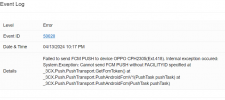
Just looking in the log before I noticed this
1712761115614.png

and hence my post here

Any help appreciated !
 
If you re-run the firewall checker, does it still pass?

Do you use IPv6?

If you turn on "keep active" in the Android 3CX app menu, do calls ring when the app is in the background?

Does this happen on both mobile data and WiFi?
 
@DaleSharp
Hi there.
Your Debian OS should have been upgraded to Debian 12, you will need to confirm and verify that.
Also, check your outbound traffic reaching the Apple server's IPs and there is no issue with your DNS too.
 
  • Like
Reactions: Nathan@Voxtelesys
If you re-run the firewall checker, does it still pass?

Do you use IPv6?

If you turn on "keep active" in the Android 3CX app menu, do calls ring when the app is in the background?

Does this happen on both mobile data and WiFi?

Firewall passes as OK

Not using IPv6

Same result on mobile data or wifi

Keep active yes and other settings that oppo require

It wont even ring when its open in the foreground

1712847423274.png

the only time the mobiles phone rings is whe it appears in the phones menu with the other IP phones
 
@DaleSharp
Hi there.
Your Debian OS should have been upgraded to Debian 12, you will need to confirm and verify that.
Also, check your outbound traffic reaching the Apple server's IPs and there is no issue with your DNS too.
Hi Oleg.. thanks for the reply

The OS was upgraded to Debian 12 with the change to V20

DNS is using 8.8.8.8
No outbound firewalling
 
So only Android is working and only in the keeping active mode?
When calling iOS, do you get that error in the console?
Did you try to run the Wireshark and filter with DNS and apple IPs when placing the call to see if there is a reply from the apple server when the push is sent from the Phonesystem?
 
Hi Oleg,

Yes, Androids are only ringing with keep alive options
If I turn those options off the app receives no calls at all in the foreground or background


iOS wont ring in background
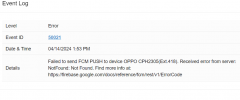
I'm not getting that IOS error in console when calling every time.. just randomly

However I am now getting the below when I call my android phone

1713017989462.png
I will have to install use iptraf or some other app as its a VM with no console and dump some data to see how its talking to apple servers.
 
1713074162179.png
new message after downing the ipv6 interface.
 
Yes.. and everything came good!

For others with the same problem you can turn off ipv6 in debian like this

edit /etc/sysctl.conf
add the following lines

net.ipv6.conf.all.disable_ipv6 = 1
net.ipv6.conf.default.disable_ipv6 = 1
net.ipv6.conf.lo.disable_ipv6 = 1

Thanks for your help gents
 
  • Like
Reactions: OlegR_3CX
Excellent and thank you for the feedback.
I will now close this thread.
 
Status
Not open for further replies.

Forum statistics

Threads
111,953
Messages
589,915
Members
164,850
Latest member
masvty