iOS App Beta 18.6.4.651 & 2N door intercom

Status
Not open for further replies.

3cxTester2018

Forum User
Joined
Apr 30, 2018
Messages
15
Reaction score
16
Hello all,

we are just testing the iOS App beta version 18.6.4.651 with H.264 support.
Wiith door intercom from 2N like IP Verso, IP Verso 2 or IP Style the video call function is still not working.
We tried activate/deactivate the sendrecv attribute, different resolutions but still get no video.
Does anybody got it up and running?

Regards
Ralf Schweiger from getcom
 
@edelmaca
Be sure that the mobile clients has the "Support Re-Invite" enabled in their Management Console extension page.
 
I can’t find this setting on my SBC Version 20.0 Update 1 (Build 671) in admin settings in user options.
 
@edelmaca
Hi there.
Those options are not there in V20, and they are ON by default for all the 3CX Users.
 
  • Like
Reactions: Evolute IT
Even weirder that it is not working here.
 
I`m using the on-premise version only, also for all my customers.
In the meanwhile I have it running for 2N IP Verso, IP Verso 2.0 and IP Style without any issue.

There is one point left for 2N IP Style which has the possibility for bidirectional Video which is not showing on the door intercom. This is again on 2N side to fix. They got a tcpdump and they will check this next week.
 
  • Like
Reactions: Vali_3CX
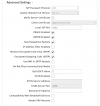
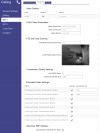
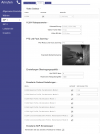
This is the setup of an IP Verso 2.0:

1711823006663.png


1711822926241.png
 

Attachments

  • 1711822870164.png
    1711822870164.png
    224.4 KB · Views: 5
  • Like
Reactions: Vali_3CX
Thank you for your screenshots. I did all the settings. Only voice calling is possible.
Maybe I did something wrong on the 3CX side.
How do I have to set the ip verso 2.0 there as user?
 
There is nothing special, only basic setup as described here for version 18: https://wiki.2n.com/hip/inte/latest/en/1-pbx/3cx-phone-system. It is the same for IP Style, IP Verso, IP Verso 2.0 @ 3CX V20.x.

Can you check if the webclient is working?
In the webclient also video is working now for all 2N devices.

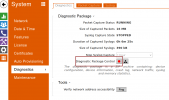
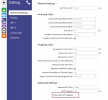
Could you please enable the "Extended SIP Logging" in "Calling" => "General Settings" (new in FW 2.43, especially added for this video issues) and then start a packet capture in "System" => "Diagnostic" => "Diagnostic Package Control", call your 2N device and try a video call with your iPhone/iPad, hang up, and then download the trace.
If you got it, send me a PM with the attached file. I will forward it to the developers of 2N. Then we will see, what is the root cause...

1712015134133.png

1712014961873.png
 
Last edited:
Status
Not open for further replies.

Forum statistics

Threads
111,973
Messages
590,079
Members
164,898
Latest member
grahamaskew