emtexcc Free User Joined Dec 10, 2020 Messages 33 Reaction score 0 May 3, 2022 #1 Hi, soon I will change my public IP and I see that under network I can change IP but will 3cx FQDN also be changed or I need to contact support directly? Best regards,
Hi, soon I will change my public IP and I see that under network I can change IP but will 3cx FQDN also be changed or I need to contact support directly? Best regards,
Saqqara Bronze Partner Basic Certified Joined Mar 12, 2014 Messages 4,775 Reaction score 1,471 May 3, 2022 #2 When you change the public IP address, yes the 3CX FQDN will be updated. Depending on your license - std and pro this can take 6hrs, enterprise is 6 mins. Reactions: Evolute IT
When you change the public IP address, yes the 3CX FQDN will be updated. Depending on your license - std and pro this can take 6hrs, enterprise is 6 mins.
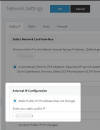
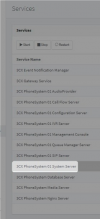
ChrisC_3CX Staff member 3CX Support Joined Dec 18, 2018 Messages 4,594 Reaction score 1,365 May 4, 2022 #3 Just want to add that once you change your IP you should: • Go to "Settings >> Network" make sure "Static Public IP" is selected and then update the IP with the new one: • Then go to "Dashboard >> Services" select the 3CX System Service and restart it: • I'd then recommend checking the DNS record using google's toolbox: https://toolbox.googleapps.com/apps/dig/ Bear in mind that an ENT 3CX License has a 5 minute DNS TTL whereas a PRO and STD License have a 6 hour DNS TTL.
Just want to add that once you change your IP you should: • Go to "Settings >> Network" make sure "Static Public IP" is selected and then update the IP with the new one: • Then go to "Dashboard >> Services" select the 3CX System Service and restart it: • I'd then recommend checking the DNS record using google's toolbox: https://toolbox.googleapps.com/apps/dig/ Bear in mind that an ENT 3CX License has a 5 minute DNS TTL whereas a PRO and STD License have a 6 hour DNS TTL.