• We do not provide troubleshooting help for unsupported phones. Please try with a supported phone.
  • V20 Update 10 Alpha Learn more

Solved IP Phones Set-up

Status
Not open for further replies.

Htet Aung Lin

Free User
Basic Certified
Joined
May 23, 2022
Messages
9
Reaction score
0
We have the 3cx system hosted on google cloud and already implemented the SBC gateway. Is there anything else we need to use IP phone for our office PBX system?
 
Hello,

You should be ready to deploy your phones now if the SBC is running.

Please read here: https://www.3cx.com/sip-phones/

Simply follow the guide for your specific phone models, and you should be able to have them working within a few minutes.


PS: Make sure the phones are on the same LAN and subnet as the SBC machine - this is very important.
 
Hello,

You should be ready to deploy your phones now if the SBC is running.

Please read here: https://www.3cx.com/sip-phones/

Simply follow the guide for your specific phone models, and you should be able to have them working within a few minutes.


PS: Make sure the phones are on the same LAN and subnet as the SBC machine - this is very important.
I got another issue.
In this scenario, I assigned an extension to both web-client and IP phone. Whenever I pick up the incoming call via web-client, the loud-speaker mode in IP phone gets automatically turned on and the voice can only be heard and answered by IP phone, but not by the web-client.
Is it normal or plz let me know if there is any setting I need to fix?
Thanks for your time and consideration.
 
I got another issue.
In this scenario, I assigned an extension to both web-client and IP phone. Whenever I pick up the incoming call via web-client, the loud-speaker mode in IP phone gets automatically turned on and the voice can only be heard and answered by IP phone, but not by the web-client.
Is it normal or plz let me know if there is any setting I need to fix?
Thanks for your time and consideration.
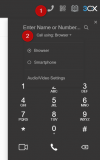
You need to set your primary device as the web client when using the softphone.
 
Yes, click the Dialler icon, the click "Call using..." and make your choice from here

1655275426516.png

...and feel free to start a new thread if you need help with another topic!
 
  • Like
Reactions: Htet Aung Lin
Status
Not open for further replies.

Members Online Now

No members online now.

Forum statistics

Threads
111,831
Messages
589,277
Members
164,660
Latest member
RJenkinsROCK